Free VR slot games are virtual-reality casino experiences that use simulated chips or credits rather than cash wagers. Unlike ordinary mobile or browser slots, genuine VR slots place the machines inside a three-dimensional environment and let players interact through a headset and motion controls.
The practical selection is limited. Vegas Infinite is the most accessible current option for players who want slots inside a larger social casino. Slot Man VR is a narrower, older PC VR slot simulator worth checking where its Steam listing remains available and compatible. Neither option should be treated as a way to win or withdraw money.
For more non-cash casino categories, visit the free VR casino games guide.
Free VR Slot Games at a Glance
| VR application | Type of experience | Virtual setting | Currency model | Typical interaction | Platforms to check |
|---|---|---|---|---|---|
| Vegas Infinite | Social VR casino containing slots and other table games | Large multiplayer casino spaces | Play-money chips, with optional purchases available | Motion controllers and spatial casino interfaces | Meta Quest, SteamVR-compatible PC VR systems, PlayStation VR2 |
| Slot Man VR | Dedicated slot-machine simulator | Smaller room focused on machines | Simulated credits with no cash-out | Machine buttons, levers, and tracked controllers | Windows PC VR through Steam; verify current headset support |
Availability, supported headsets, account requirements, and purchase options can change. Check the current platform store page before downloading either application.
What Makes a Slot Game a Genuine VR Slot?
A slot game qualifies as VR when the virtual environment and spatial interaction are central to the experience. Merely displaying a conventional slot interface on a floating screen inside a headset does not provide the same type of interaction.
A genuine VR slot experience normally includes several of these elements:
- A three-dimensional machine: The cabinet occupies space in the virtual room rather than appearing only as a flat app window.
- Head-tracked viewing: Players can lean toward the reels, look around the cabinet, and inspect the surrounding casino.
- Tracked input: Buttons, levers, menus, or nearby objects respond to motion controllers or another supported spatial input method.
- A navigable scene: The player may stand, sit, turn, or move between machines.
- Spatial audio: Machine effects and ambient casino sounds appear to come from positions in the environment.
- VR-scale presentation: The cabinet, controls, and room are designed around the player’s perceived body position.
These features distinguish VR slots from conventional mobile games, desktop slots, and flat casino apps viewed through a headset’s theater mode.
VR Slots Versus Conventional Screen-Based Slots
| Feature | Genuine VR slots | Mobile or desktop slots |
|---|---|---|
| Display | Immersive stereoscopic environment | Flat screen |
| Machine position | Exists as an object in a virtual room | Represented by a 2D interface |
| Controls | Motion controllers, spatial pointers, or virtual hands | Touchscreen, mouse, or keyboard |
| Movement | May allow looking, leaning, turning, or walking between machines | Navigation occurs through menus |
| Social presence | May include nearby avatars and shared casino spaces | Usually limited to profiles, chat, or leaderboards |
| Physical space | Requires attention to the headset boundary and surroundings | No room-scale safety considerations |
VR does not change the basic slot loop: select a stake in simulated credits, start a spin, and view the result. Its contribution is presence—the impression of sitting or standing at a casino cabinet rather than operating an abstract interface.
Confirmed Free and Play-Money VR Slot Options
The category is smaller than general VR casino gaming. Many products marketed with “VR” language are panoramic videos, discontinued mobile experiences, or standard games shown on a virtual screen. The following applications have been presented as native virtual-reality experiences with slot-machine play.
Vegas Infinite
Vegas Infinite is a free-to-download social casino application with slots alongside games such as poker and other casino-table formats. It was previously known as PokerStars VR.
Its main advantage is scale. Slots are placed within a broader virtual venue rather than isolated in a simple simulation room. Players can explore casino spaces, encounter other users, customize their avatars, and move between supported game areas.
For slot players, the relevant characteristics are:
- slot machines are part of a three-dimensional casino;
- play uses virtual chips rather than withdrawable winnings;
- multiplayer presence creates a more social atmosphere;
- the application includes optional digital purchases;
- headset and controller support depends on the selected platform.
Vegas Infinite is best suited to players who want a lively casino environment and do not mind installing an application that covers much more than slots. Someone seeking only a quick, distraction-free machine simulator may find the wider social features unnecessary.
The application also requires more orientation than a conventional slot app. Players may need to learn locomotion, avatar controls, chip management, and casino navigation before focusing on the machines.
For a closer look at the wider platform, see the dedicated Vegas Infinite review.
Slot Man VR
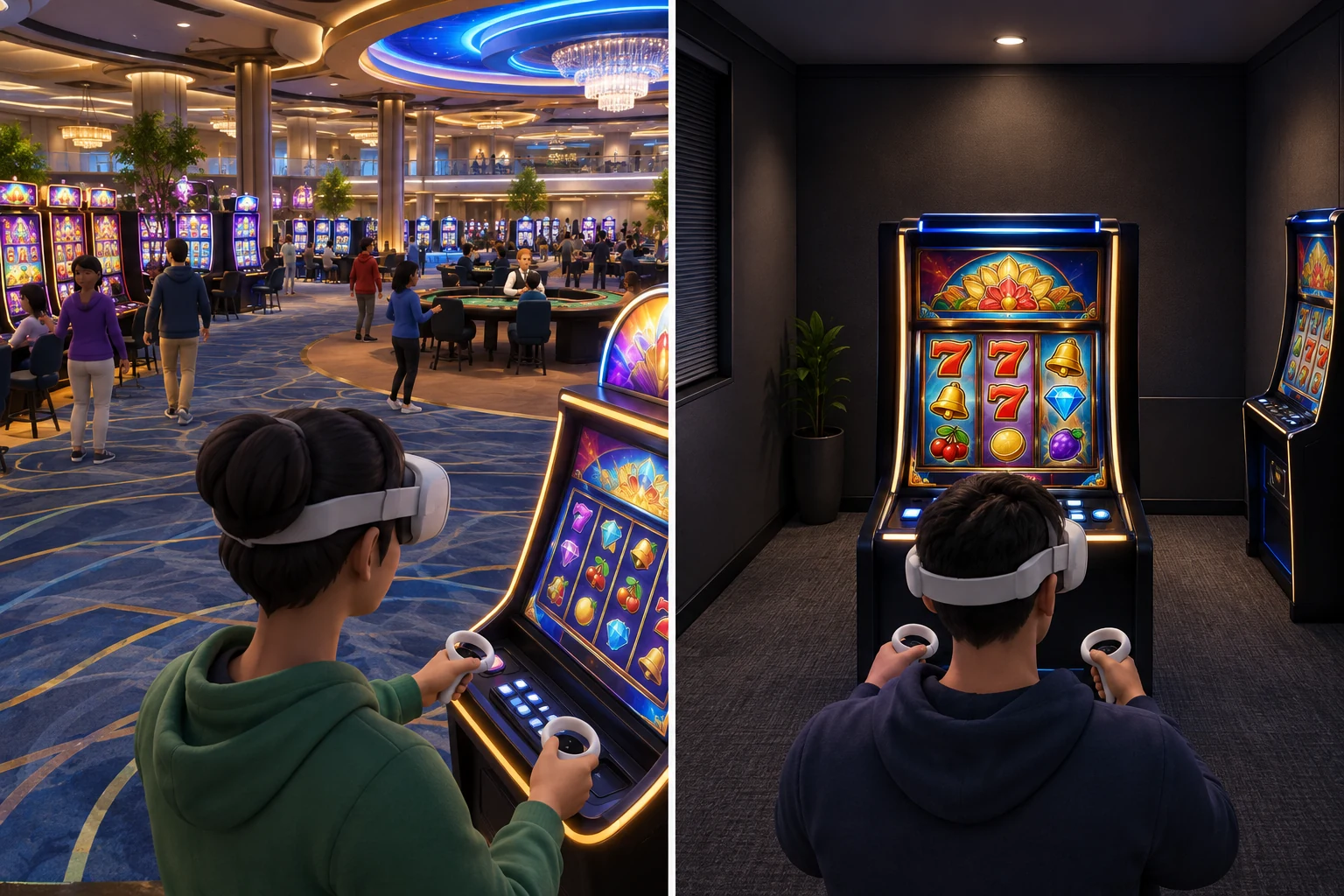
Slot Man VR is a dedicated PC VR slot-machine simulator listed through Steam. Its scope is narrower than Vegas Infinite: the emphasis is on interacting with virtual slot cabinets rather than participating in a large social casino.
This simpler format can suit players who want:
- a machine-focused VR experience;
- a smaller scene with fewer social distractions;
- direct interaction with cabinet controls;
- simulated slot play without a broad collection of casino activities.
However, it is an older PC VR release. That matters because legacy applications may not receive updates for newer headsets, controller layouts, operating systems, or VR runtimes. A Steam page remaining visible does not guarantee trouble-free operation on every current device.
Before installing Slot Man VR, confirm:
- The Steam listing is available in your region.
- Your Windows PC meets the listed requirements.
- Your headset works with the required PC VR runtime.
- The listed controller support matches your hardware.
- Recent user reports do not identify unresolved launch or input problems.
Slot Man VR is not a direct substitute for a modern social casino. It is better understood as a compact slot simulation from an earlier generation of consumer VR.
How Scenes, Interfaces, and Controls Differ
The quality of a VR slot experience depends on more than reel graphics. Scene design and input determine whether the application feels intuitive or cumbersome.
Casino-floor scenes
A casino-floor application places machines within a larger venue. Players may move through rooms, see other avatars, and choose a machine by approaching it.
This design provides:
- a stronger sense of place;
- social activity around the machines;
- visual variety outside the immediate slot cabinet;
- transitions between slots and other casino games.
The trade-off is complexity. Locomotion menus, multiplayer settings, avatar systems, and environmental effects can make the application less direct.
Vegas Infinite follows this broader social-casino model.
Dedicated slot rooms
A dedicated simulator reduces the surrounding environment and concentrates on the cabinet. There may be little reason to move beyond selecting a machine or changing position.
Benefits include:
- faster access to the slot interface;
- fewer multiplayer distractions;
- simpler navigation;
- potentially lower visual complexity.
The disadvantage is limited variety. Once the player has examined the available machines and interactions, there may be less to explore.
Slot Man VR is closer to this model.
Common VR slot controls
VR slot interfaces can use several input styles:
- Direct virtual buttons: The player moves a tracked controller toward a button and presses or touches it.
- Laser-pointer selection: A ray from the controller highlights a control, which is then selected with a trigger.
- Lever interaction: The player reaches toward a virtual lever and performs a pulling motion.
- Controller shortcuts: Physical controller buttons activate common functions without requiring precise virtual contact.
- Gaze-assisted selection: Looking at an interface element helps target it before confirmation.
Direct interaction is more immersive, but pointer-based controls can be easier when seated or when the machine is outside comfortable reach. Well-designed applications provide clear highlighting, readable labels, and immediate feedback after an input.
Interface qualities to check
A usable VR slot interface should make the following information easy to find:
- current simulated-credit balance;
- selected play amount;
- active lines or game options, where applicable;
- spin control;
- result and credit changes;
- settings for audio, comfort, and movement;
- purchase prompts, if optional purchases exist.
Readability is especially important in VR. Small text that works on a monitor may be uncomfortable in a headset, particularly on lower-resolution hardware or when the virtual machine cannot be repositioned.
Virtual Chips, Credits, and Optional Purchases
Free-to-download does not necessarily mean that every virtual item is included without charge. VR casino applications may combine complimentary access with optional purchases.
What play-money currency means
Play-money chips or credits are in-app units used to activate games and record simulated wins and losses. They are entertainment resources, not money held in an account.
In a play-money VR slot:
- credits may be supplied when the player starts;
- spins deduct simulated credits;
- winning combinations add virtual credits;
- the balance remains inside the application;
- credits and virtual prizes have no cash-out function.
The exact method for receiving additional chips varies by application and may change with updates. Possible systems include recurring allocations, progression rewards, promotional grants, or optional purchases. Players should rely on the current in-app disclosures and store description rather than an old guide or video.
Common purchase categories
A free VR casino may offer purchases such as:
- additional virtual chips;
- avatar clothing or accessories;
- cosmetic props;
- bundles combining currency and digital items;
- access to optional customization features.
Purchase availability can differ by platform, account, age setting, and region.
How to keep play genuinely free
Use the following checklist before starting:
- [ ] Review the platform store’s in-app purchase label.
- [ ] Check whether the application can be used without buying extra chips.
- [ ] Disable or protect purchases with a password or PIN.
- [ ] Avoid saving payment details if accidental purchases are a concern.
- [ ] Read each confirmation screen instead of rapidly accepting prompts.
- [ ] Treat virtual-chip depletion as a reason to stop, not an obligation to buy more.
- [ ] Use headset-level parental or family controls where appropriate.
A “free” listing usually refers to the initial download. It should not be interpreted as a promise that every currency bundle, cosmetic item, or feature is included.
Headset and Platform Compatibility
Compatibility should be checked at the level of the specific headset, store, and runtime. “PC VR support” alone does not guarantee that an older application will recognize a modern controller.
Meta Quest
Vegas Infinite has been distributed for supported Meta Quest headsets. A native Quest version runs on the headset without requiring a gaming PC, although account, internet, and storage requirements still apply.
Check the current Meta Horizon store listing for:
- the exact Quest models supported;
- required free storage;
- controller or hand-input requirements;
- internet and account requirements;
- comfort and age information.
Slot Man VR is not a native standalone Quest application. Using a Quest headset for a PC VR title would require a suitable VR-capable computer and a supported connection method, subject to the title’s runtime and controller compatibility.
SteamVR and PC VR
Both application availability and hardware compatibility should be confirmed through Steam and the headset manufacturer.
For a PC VR setup, verify:
- Windows version;
- processor, graphics card, and memory requirements;
- available USB, DisplayPort, or wireless connection support;
- SteamVR compatibility;
- tracked-controller mappings;
- available play-space requirements.
Older VR software may launch but still present problems such as incorrect controller models, inaccessible buttons, poor resolution scaling, or missing bindings.
PlayStation VR2
Vegas Infinite has been available for PlayStation VR2. Confirm its current PlayStation Store status and any PlayStation Network requirements before downloading.
Slot Man VR is a PC title and should not be assumed to have a PlayStation VR2 version merely because PC adapters or alternative connection methods exist.
How to Choose the Right VR Slot Experience
Choose according to the environment and hardware you already have rather than the number of machines advertised.
Choose Vegas Infinite if you want:
- a modern social casino atmosphere;
- slots within a larger venue;
- avatar and multiplayer features;
- standalone Quest or console access where supported;
- continued access to several casino-style game categories.
Consider Slot Man VR if you want:
- a dedicated slot simulator;
- fewer social systems;
- a compact PC VR environment;
- an older, machine-focused experience;
- a free listing that you can test on compatible hardware.
Skip an application if:
- it only displays a flat mobile game inside a virtual theater;
- the store page does not clearly confirm native VR support;
- controller compatibility is unclear;
- recent reports indicate that it no longer launches;
- purchase prompts are not sufficiently transparent;
- text or controls are difficult to use with your headset.
Frequently Asked Questions
Can VR slot games be played while seated?
Often, yes. A seated position is practical when the virtual cabinet can be reached with a pointer or repositioned through the application. Before playing, recenter the headset and make sure the virtual controls are not below the chair, behind a desk, or beyond comfortable arm’s reach.
Do free VR slots work offline?
Do not assume they do. Social casino applications commonly depend on an internet connection for accounts, multiplayer spaces, balances, or content delivery. A smaller simulator may have fewer online features, but its current store page should confirm whether an internet connection is required.
Are VR slot games suitable for every headset owner?
No. Platform requirements, age classifications, motion comfort, visual clarity, and account restrictions all matter. Casino-themed content may also be inappropriate for younger users even when it uses only simulated credits. Follow the age information shown by the relevant headset store.
Can a standard mobile slot app become a VR game by opening it in a headset?
No. Viewing a flat app through screen mirroring, a browser window, or virtual theater mode does not add spatial cabinets, tracked machine controls, or a navigable casino. It remains a conventional screen-based slot displayed inside VR.
Final Recommendation
For most players, Vegas Infinite is the clearest starting point because it offers native VR slot play inside a developed social casino and supports several major headset ecosystems. It is best for atmosphere, multiplayer presence, and variety, though its optional purchases and broader casino systems require attention.
Slot Man VR is the more specialized alternative for compatible PC VR users who prefer a simple slot-machine simulator. Because it is an older release, confirm current availability and controller support before relying on it.
Whichever application you choose, verify three things first: it is genuinely built for VR, it uses only simulated credits, and it supports your exact headset and controllers.