Free VR roulette games let you stand beside a virtual wheel, place play-money chips with motion controllers, and watch the ball settle from a table-level perspective. The strongest options are usually social casino applications rather than standalone roulette simulators.
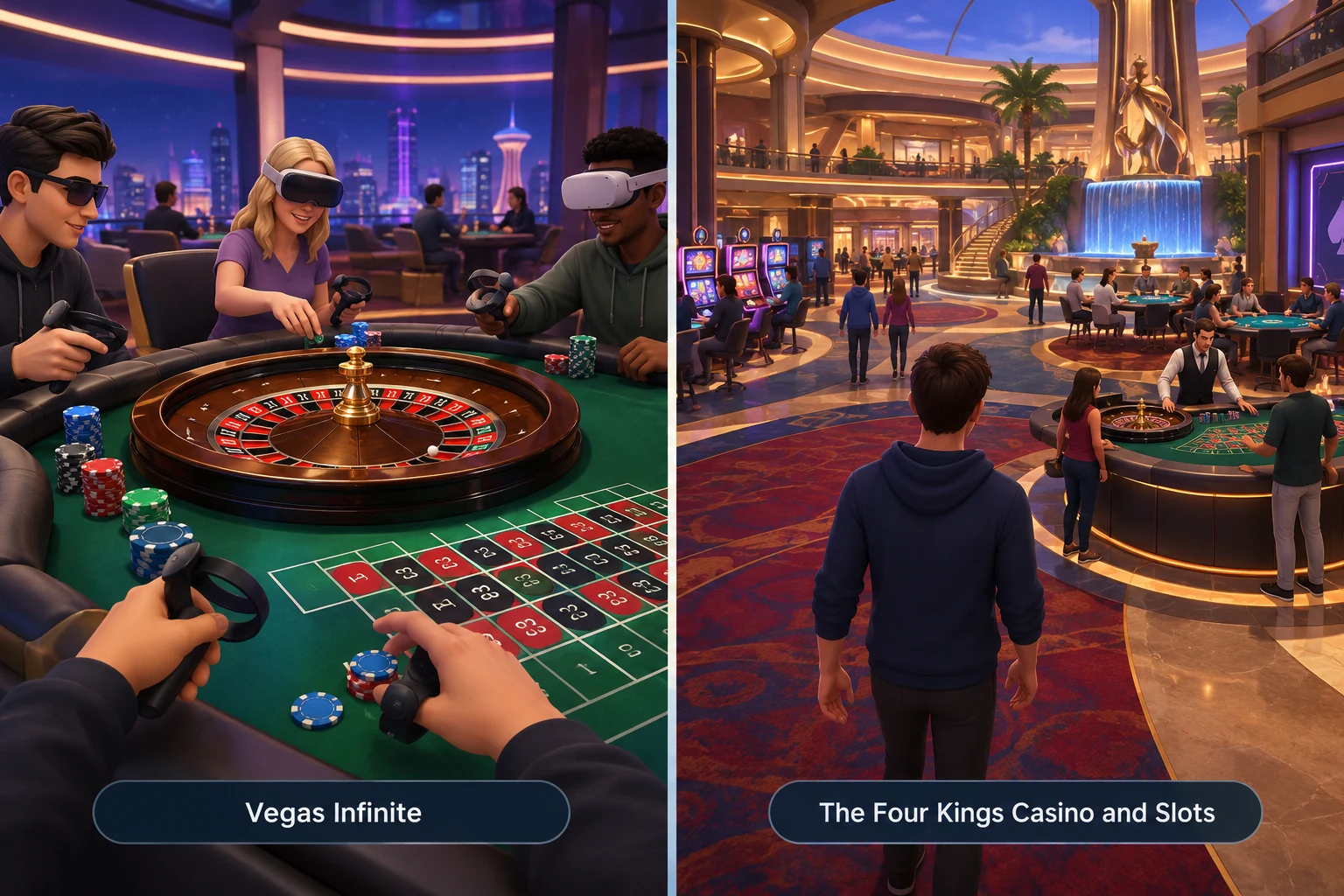
Two established applications with both VR support and roulette are Vegas Infinite and The Four Kings Casino and Slots. Both use virtual currency rather than cash wagering, but their presentation, device support, controls, and wider casino environments differ.
At a glance: Choose Vegas Infinite for a modern, VR-first social casino experience. Consider The Four Kings Casino and Slots if you use PC VR and prefer a broader casino-world format with character progression. Availability, headset support, and in-app features can change, so confirm the current store listing before downloading.
Confirmed Free VR Roulette Options
“Free” generally means that an application can be downloaded or accessed without an initial purchase. It does not necessarily mean that every cosmetic item, chip package, or optional feature is free. The chips used at these tables are virtual and are not cash wagers.
| Application | Roulette format | VR presentation | Social elements | VR device availability |
|---|---|---|---|---|
| Vegas Infinite | Play-money roulette within a multi-game social casino | VR-first tables, interactive chips, avatars, and motion-controller play | Multiplayer tables, avatars, voice communication, and social props | Available across major current VR platforms, including Meta Quest, PlayStation VR2, and PC VR through Steam; check regional store listings |
| The Four Kings Casino and Slots | Roulette inside a larger virtual casino | Walkable casino environment with VR support on compatible PC hardware | Shared spaces, player avatars, progression, and multiplayer casino activity | Primarily relevant to PC VR users; verify current headset and controller compatibility on Steam |
Vegas Infinite
Vegas Infinite is a free-to-play social casino application built around shared virtual tables. It began as PokerStars VR and later expanded its identity and game selection beyond poker. Roulette is one of several play-money casino activities available in the application.
Its roulette experience emphasizes physical presence. Players can sit or stand around a rendered table, handle virtual chips, interact with other avatars, and view the wheel from different positions. Motion controllers make chip placement feel closer to moving chips across a physical layout than selecting bets from a conventional flat-screen menu.
The application is best suited to players who want:
- A contemporary VR-first interface
- Populated social tables
- Expressive avatars and interactive objects
- Motion-controller chip handling
- Several play-money table games in one application
- Support for current standalone, console, or PC VR systems
Because Vegas Infinite is a wider social platform, roulette may not be the only activity visible when entering the application. Menus, social spaces, account systems, and other tables are part of the overall experience.
For a closer look at the complete application rather than roulette alone, see the Vegas Infinite review.
The Four Kings Casino and Slots
The Four Kings Casino and Slots presents its games as part of a larger virtual casino world. Roulette sits alongside other casino-style activities, avatar customization, shared spaces, and progression systems.
Its approach differs from a dedicated VR table simulator. The casino floor and player identity are central to the experience, so it may appeal to users who like exploring a venue and developing an avatar rather than moving directly from a launch screen to a roulette wheel.
The Four Kings is most relevant to PC users investigating compatible VR modes. It has been available for a long time, and support details can differ between headsets, runtimes, and controller configurations. Check the current Steam listing and recent user reports before installing it specifically for VR roulette.
Consider it if you want:
- Roulette inside a walkable casino environment
- Avatar customization and progression
- Shared public spaces
- A PC-based social casino
- Both casino-floor exploration and table play
Players with newer standalone headsets should not assume that the application has a native version for their device. PC VR access may require a suitable computer, a supported VR runtime, and either a cable or compatible wireless connection.
How Roulette Works in VR
The underlying game remains recognizable: players predict where a ball will land on a numbered wheel. Bets are placed on a table layout before the betting period closes. A winning bet is determined by the numbered pocket in which the ball settles.
A typical VR round follows five steps:
-
Join or approach a table.
The application places you at a roulette table, either alone or with other players. -
Choose a virtual chip value.
Chip denominations may appear as physical stacks, controller menus, or interface buttons. -
Place a bet on the layout.
Point at, pick up, or drag the chip to a number, color, range, or other betting area. -
Wait for betting to close.
The wheel spins, and the application stops accepting new wagers at a defined point. -
View the result and payout.
The winning number is highlighted, losing chips are removed, and any play-money return is added automatically.
Common roulette bets
The table layout supports two broad categories of bets.
Inside bets cover individual numbers or small groups of adjacent numbers:
- Straight-up number
- Split between two numbers
- Street of three numbers
- Corner covering four numbers
- Six-line bet
Outside bets cover larger groups:
- Red or black
- Odd or even
- Low or high
- Dozens
- Columns
Inside bets cover fewer possible outcomes and therefore have larger listed payouts. Outside bets cover more outcomes but offer smaller payouts. A zero result can cause common even-money bets to lose, subject to the rules being used.
European and American wheels
The most important rules distinction is the number of zero pockets.
| Wheel type | Zero pockets | Total pockets | Visual clue |
|---|---|---|---|
| European roulette | One: 0 | 37 | A single green zero |
| American roulette | Two: 0 and 00 | 38 | Green 0 and green 00 |
A single-zero and double-zero wheel should not be treated as interchangeable. Before placing chips, inspect both the wheel and table layout. A table with a 00 betting space is using the American layout.
Some applications may change available tables, rules, or rooms over time. The wheel shown inside the current app is more reliable than an old screenshot or review.
What the Wheel and Table Add in VR
A flat roulette game can communicate almost everything through buttons and numbers. VR adds spatial interaction: the distance to the betting area, the movement of chips, the scale of the wheel, and the presence of other players all become part of the experience.
A table-level view
In VR, players can watch the wheel from approximately the same perspective as someone standing or sitting at a physical table. This makes it easier to follow the ball visually, although the application still determines the result and settles bets automatically.
Useful viewing features can include:
- Repositioning around the table
- Seated and standing height adjustment
- Snap turning or smooth turning
- Recent-result displays
- Highlighting of the winning number
- Automatic centering or recentering
A clear recent-results board can be convenient, but previous spins do not establish what the next independent spin will be.
Physical chip placement
Motion controls are one of the main reasons to choose VR roulette. Depending on the application, a player may pick up a chip, aim a pointer, or use a hybrid system.
Direct handling feels more physical but can also be less precise. Small inside-bet areas are close together, so an unintended hand movement may place a chip on a split, corner, or neighboring number. Good interfaces show a bet marker or confirmation before betting closes.
A rendered wheel
The wheel may be presented as a fully animated object rather than a small video window. This adds atmosphere, but visual realism should not be confused with manual operation. The software controls the round, identifies the result, and awards virtual chips.
When evaluating the wheel, look for:
- Clearly readable numbers
- A visible 0 or 00 configuration
- Smooth animation without affecting comfort
- An unambiguous winning-number indicator
- A reliable way to distinguish open and closed betting
Wheel, Table, and Control Differences
The best control method depends on whether you value physical interaction, speed, or accessibility.
| Control method | How it works | Main advantage | Possible drawback |
|---|---|---|---|
| Direct hand or controller interaction | Pick up chips and place them on the layout | Most tactile and immersive | Small betting areas can be difficult to target |
| Laser pointer | Aim a controller ray and confirm a position | Accurate from a seated position | Feels less like handling physical chips |
| Controller menu | Select chip values and bets through a menu | Fast and easy to read | Reduces table-level interaction |
| Hybrid controls | Combine physical chips with menus or pointers | Balances immersion and precision | More controls to learn |
| Hand tracking | Use tracked hands without controllers where supported | Natural interaction with fewer accessories | Tracking quality can vary with lighting and hand position |
Not every application supports every method. Hand tracking in particular should be confirmed for the specific headset and current app version rather than assumed.
Comfort and accessibility checklist
Before settling into a long session, check whether the application provides:
- Seated play
- Height or table-position adjustment
- Snap turning
- Smooth turning that can be disabled
- Controller remapping or left-handed options
- Readable chip values
- Clear bet confirmation
- Volume controls for voices and table sounds
- Personal-space or avatar-blocking tools
- Mute and reporting controls
Roulette normally involves less artificial movement than an exploration-heavy VR game, but entering a casino room or moving between tables can still require locomotion. Seated users should also ensure that chip areas can be reached without leaning beyond a comfortable range.
Social Tables and Virtual Chips
Social interaction is a defining feature of many free VR roulette applications. Other players may appear as avatars, speak through voice chat, react to results, or use virtual props.
This can make a table feel active, but it also means the experience depends partly on who else is present. Public-table behavior and room population can vary by time, region, platform, and moderation settings.
Social features to compare
Look for the following when choosing an application:
- Public and private tables
- Voice chat with individual mute controls
- Friend invitations
- Cross-platform play
- Personal-space boundaries
- Avatar customization
- Blocking and reporting tools
- Host or room controls
- Age and account requirements
Players who want quiet practice should check for private rooms, solo tables, or an option to mute the full table. A social VR application is not automatically a good solo roulette trainer.
What play-money means
Virtual chips are in-app units used to participate in rounds. They do not turn the table into a cash roulette game, and they should not be described as money simply because the interface resembles a casino.
A free-to-play application may distribute chips through mechanisms such as:
- Starting balances
- Periodic allocations
- Login rewards
- In-app progression
- Optional purchases
The exact system can change. Review the current application description and purchase screen before using it.
Optional chip purchases can matter even when nothing of cash value is being wagered. Set personal limits on spending and session length, particularly if the application uses repeated rewards, streaks, or casino-style presentation.
For other no-cash VR game categories, visit the free VR casino games hub.
Supported Devices: How to Choose a Compatible App
Compatibility involves more than the headset name. An application may be available natively on one device but require a gaming PC on another.
Device comparison
| Setup | What to verify | Likely fit |
|---|---|---|
| Standalone Meta Quest headset | Exact supported Quest models, storage, controllers, account requirements, and regional availability | Vegas Infinite is the more direct option |
| PlayStation VR2 | PlayStation Store availability, Sense controller support, and online requirements | Vegas Infinite is the relevant confirmed option |
| PC VR through Steam | Windows requirements, GPU capability, supported runtime, headset support, and tracked controllers | Both applications may be considered |
| Standalone headset connected to a PC | Link method, network quality for wireless play, SteamVR compatibility, and PC performance | Access depends on the PC version rather than the standalone store |
| Older PC VR headset | Current runtime support, controller mapping, and recent user reports | The Four Kings may be worth checking, but compatibility should not be assumed |
Pre-download checklist
- Find the official store page for your platform.
- Confirm that VR is supported, not merely flat-screen play.
- Check whether your exact headset model is listed.
- Verify tracked-controller requirements.
- Review seated-play and comfort options.
- Check download size and available storage.
- Read the virtual-currency and in-app purchase details.
- Confirm whether an account or online connection is required.
- Look for recent updates or compatibility reports.
Store listings should be treated as the current authority because headset support, operating-system requirements, and available features can change after publication.
Which Free VR Roulette Game Should You Choose?
Choose Vegas Infinite if you want a polished, VR-first roulette table, current-headset availability, and an active social format. It is the clearest starting point for most standalone, PlayStation VR2, and modern PC VR users.
Choose The Four Kings Casino and Slots if you have a compatible PC VR setup and want roulette inside a larger casino world with avatars, exploration, and progression. Confirm current VR functionality before downloading because its platform history and hardware support are broader and more complex.
Whichever application you choose, inspect the wheel type, test chip placement with small virtual denominations, configure comfort settings, and use mute or private-room tools when needed. The best VR roulette experience is not simply the most realistic-looking wheel; it is the one that provides clear rules, precise controls, suitable social settings, and reliable support for your headset.