For most players, Meta Quest 3 or Quest 3S is the simplest choice for VR casino games because each works as a standalone headset while retaining the option to connect to a gaming PC. A PC VR setup using SteamVR offers the broadest access to PC-based titles, but it adds hardware requirements and compatibility checks. PlayStation VR2 is a strong option when the game is explicitly available for PS5 or when you already own the equipment needed for supported PC use. Apple Vision Pro should be chosen only for a confirmed native or browser-based experience, not on the assumption that Quest or SteamVR games will work.
The right headset ultimately depends on the exact game and delivery method:
- Standalone app: Meta Quest is usually the most practical ecosystem.
- SteamVR game: Choose a compatible PC headset or a headset with supported PC connectivity.
- PS5 title: Confirm that the PlayStation Store specifically lists PlayStation VR2.
- Browser-based game: Test the site’s browser, input and immersive-mode requirements before buying hardware.
- One specific casino game: Start with that game’s official store listing, then select the headset.
Availability changes as games are updated, renamed or removed. Never rely only on a headset manufacturer’s general claim that it supports VR gaming.
How to Choose a VR Headset for Casino Games
A headset is suitable only when the entire chain is compatible: game, store, operating platform, headset, controls and—where applicable—PC. Good visual specifications cannot compensate for a game that is unavailable in the device’s ecosystem.
1. Identify where the game is distributed
Look for an official listing in one of these channels:
- Meta Horizon Store for standalone Quest apps
- Steam for SteamVR-compatible PC games
- PlayStation Store for PlayStation VR2 software
- Apple App Store for native Apple Vision Pro apps
- The developer’s official website for browser-based experiences
A game appearing on Steam does not mean that a standalone Quest version exists. Likewise, a Quest store listing does not guarantee PlayStation VR2 or Apple Vision Pro support.
2. Distinguish standalone VR from PC VR
A standalone headset runs the game on its own processor. It does not need a gaming PC for apps installed directly from its store.
A PC VR headset or PC-connected headset receives the game from a compatible computer. This approach may provide access to more PC titles, but it introduces additional requirements:
- A supported Windows PC
- A sufficiently capable graphics processor
- Compatible connection software
- A USB or DisplayPort connection, or a reliable wireless network
- Enough storage for the game and VR software
- Drivers and runtime software such as SteamVR
Meta Quest can operate in either category: standalone for Quest apps and PC-connected for supported PC VR games.
3. Check the required input method
Casino-style VR experiences may use:
- Tracked motion controllers
- Hand tracking
- Gaze and pinch input
- A standard gamepad
- Mouse and keyboard input in a desktop-style interface
Do not assume these methods are interchangeable. A browser experience designed for hand tracking may not recognize motion controllers correctly, while a SteamVR game may require buttons and triggers unavailable through hand-only input.
4. Consider the type of casino experience
“VR casino game” can describe several different products:
- Social poker or table-game environments
- Simulated slots and casino floors
- Multiplayer entertainment using virtual currency
- Browser demonstrations
- Casino-themed minigames
- Real-money services, where legally available
Headset support for a simulated casino title does not imply support for real-money gambling. Real-money availability may depend on operator policy, age verification, location, local law and payment support in addition to technical compatibility.
5. Verify support immediately before purchase
Use this checklist on the official product page:
- [ ] The exact headset or platform is named
- [ ] The game is available in your country
- [ ] Your headset model is still supported
- [ ] The required controllers are included or already owned
- [ ] Any PC meets the listed minimum requirements
- [ ] The game supports the intended seated or standing mode
- [ ] An account, subscription or internet connection is identified
- [ ] The title remains available for installation and active use
Headset and Platform Compatibility Matrix
The following matrix is designed for purchase decisions rather than as an exhaustive game catalog.
Compatibility review date: January 2025. Sources are the official platform storefronts and manufacturer documentation linked in the table. Store availability, supported models and regional access can change; recheck the current listing before buying a headset.
| Headset or ecosystem | Casino-game delivery methods | Confirmed example or compatibility route | Main requirements | Compatibility source |
|---|---|---|---|---|
| Meta Quest 3 and Quest 3S | Standalone Quest apps; PC VR through supported wired or wireless connection; browser experiences | Vegas Infinite has been distributed through the Meta Quest ecosystem | Meta account; controllers or supported hand input; gaming PC only for PC VR | Meta Horizon Store and Meta Quest Link requirements |
| Meta Quest 2 | Standalone Quest apps; PC VR connection; browser experiences | Existing Quest releases may support Quest 2, but newer titles can change model support | Confirm that the current app listing still names Quest 2 | Meta Horizon Store |
| SteamVR headsets | Native PC VR software distributed through Steam | Vegas Infinite and casino-themed PC VR titles are available through Steam; support varies by product | VR-ready Windows PC, Steam, SteamVR and a headset recognized by the game/runtime | Steam store and SteamVR |
| PlayStation VR2 on PS5 | Native PS VR2 games from PlayStation Store | Vegas Infinite has a PS VR2 release | PS5, PS VR2, PlayStation account and any game-specific online requirements | PlayStation Store |
| PlayStation VR2 on PC | Supported SteamVR software through Sony’s PC connection route | Compatibility depends on the PC adapter, PC specifications and individual Steam title | PS VR2 PC adapter, required cables, compatible DisplayPort output, Windows PC and SteamVR | Official PlayStation VR2 PC support |
| Apple Vision Pro | Native visionOS apps and compatible browser experiences | No general compatibility with Quest, PlayStation or SteamVR libraries; each experience must explicitly support visionOS or the relevant browser mode | Apple Vision Pro, supported input method and a compatible app or website | Apple Vision Pro App Store guidance |
| Browser-capable headsets | Web-delivered immersive or flat-screen experiences | Support is site-specific rather than guaranteed by the headset alone | Compatible browser, secure connection, supported controls and any required account | The game developer’s site plus its stated browser requirements |
How to read “SteamVR compatible”
SteamVR is a software platform and runtime, not a promise that every Steam VR game works perfectly with every headset. Check three separate layers:
- Headset support: Can the headset connect to and operate with SteamVR?
- Game support: Does the game list the headset or compatible controller layout?
- Feature support: Are all required controls, tracking modes and interface functions available?
A headset may launch a game through SteamVR while still showing incorrect controller prompts or lacking a required input. Community reports can reveal practical issues, but the developer’s current listing and support documentation should remain the primary purchase reference.
What Quest compatibility means
Quest has two distinct software routes:
- Quest standalone: The app is downloaded from the Meta ecosystem and runs on the headset.
- Quest PC VR: The headset connects to a computer and acts as the display and tracking system for PC software.
These versions may be sold separately and can have different graphics, features or account requirements. Cross-buy and cross-progression should never be assumed unless the publisher explicitly offers them.
What PlayStation VR2 compatibility means
On PS5, a title must have a dedicated PS VR2 release. Original PlayStation VR software does not automatically become PS VR2-compatible.
PC use is a separate route. The official PC adapter allows access to supported SteamVR software when the computer and connection satisfy Sony’s requirements. Some PS5-specific headset features may not be available on PC, so PC compatibility should not be treated as identical to the PS5 experience.
Standalone, PC VR, Console and Other Requirements
Meta Quest: best for a simple standalone setup
Quest 3 and Quest 3S are the clearest starting points for buyers who do not already own a gaming computer or console. Both can run supported standalone apps and can also connect to a PC later.
This flexibility makes Quest particularly suitable when you want:
- A relatively simple, self-contained setup
- Access to a confirmed Quest casino title
- The option to explore PC VR later
- Wireless room use
- A mix of controller and supported hand-tracking experiences
The main limitation is that the standalone catalog and Steam catalog are not the same. Buying a Quest does not provide automatic access to every PC VR casino game.
Quest 2 may remain useful for owners who already have one, but a new buyer should check current app support carefully. Developers can raise minimum hardware requirements as older models age.
PC VR and SteamVR: best for a wider PC library
PC VR is the most flexible route when the desired games are on Steam. Depending on the headset, a setup may use a direct display connection, USB connection or wireless streaming.
Before choosing PC VR, compare the game’s minimum requirements with the actual computer—not merely with labels such as “gaming laptop.” Important factors include:
- Supported graphics card
- Processor
- Memory
- Video output
- USB connections
- Operating system
- Available storage
- Network performance for wireless streaming
Laptop compatibility deserves special attention. A laptop can have a powerful graphics processor while routing its external video port in a way that does not satisfy a headset’s requirements.
Wireless PC VR also depends on the home network. The speed of the internet plan is not the only consideration; local Wi-Fi congestion, router position and the connection between the router and PC can affect responsiveness.
PlayStation VR2: best when PS5 is already part of the plan
PlayStation VR2 makes the most sense for someone who:
- Already owns a PS5
- Wants a casino game with a confirmed PS VR2 release
- Also values other games in the PS VR2 catalog
- Prefers a console-managed setup over PC configuration
It is a less compelling casino-only purchase when the desired game exists on a lower-complexity standalone platform. Its value depends on the broader PS5 and PS VR2 library you expect to use.
For PC use, include the adapter, cables and computer requirements in the decision. Do not buy PS VR2 for a particular Steam casino title until that title’s controls and headset behavior have been verified.
Apple Vision Pro: best only for a confirmed visionOS use case
Apple Vision Pro should not be treated as a substitute for a Quest or SteamVR headset. It has a different operating environment and input model, and software made for other VR stores cannot simply be installed on visionOS.
Consider it only when:
- The casino or game has a native visionOS app
- The developer explicitly supports the device’s browser
- Gaze and hand input work with all required interactions
- The experience has been tested in immersive mode, if immersion is essential
A conventional website may open as a window without becoming a controller-based VR casino. Browser access and immersive compatibility are different claims.
Comfort, Controls and Browser Support
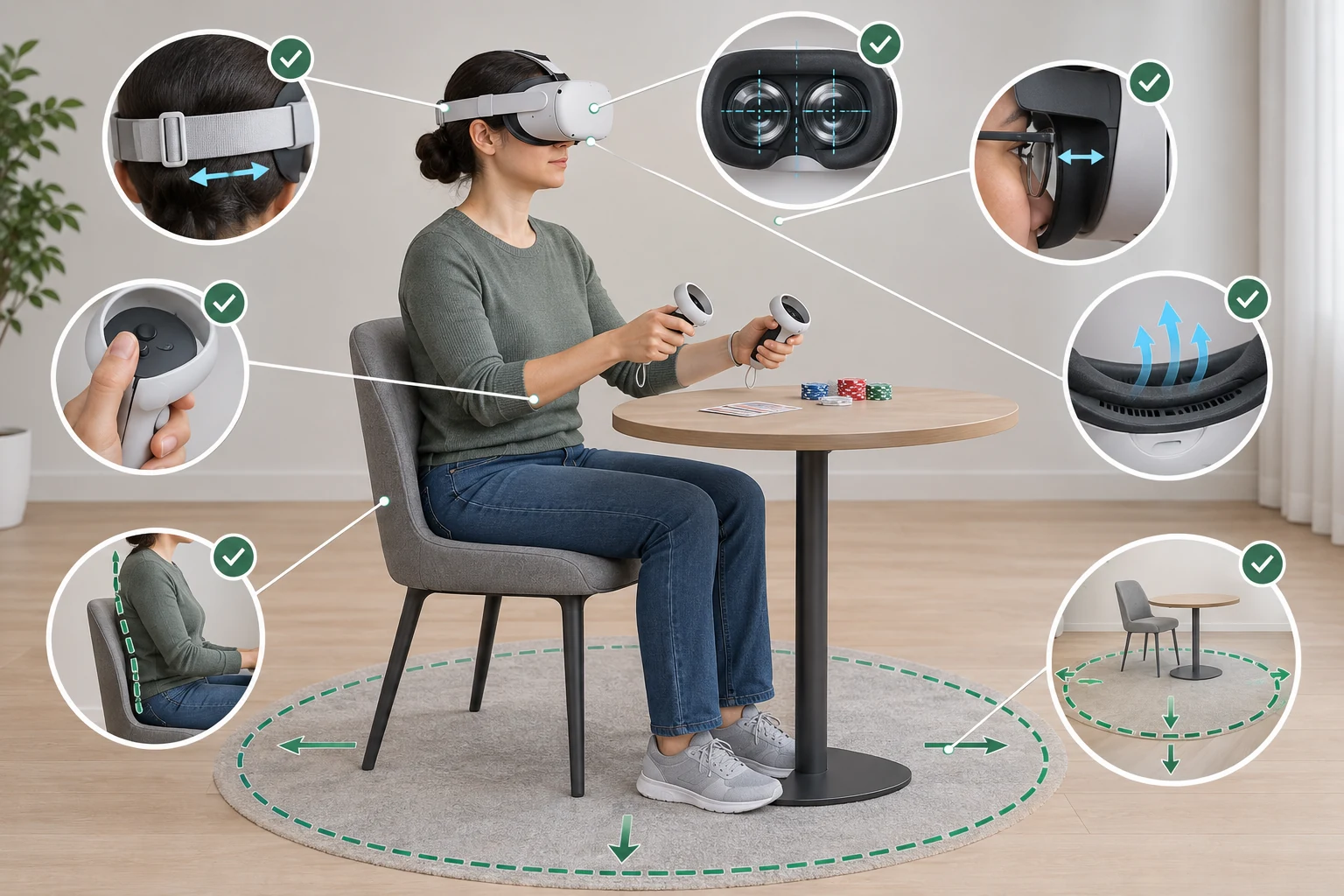
Comfort matters more in seated casino games
Casino games often involve longer seated sessions and repeated focus on nearby cards, chips, buttons or menus. A headset that feels acceptable in a short demonstration can become uncomfortable over time.
Assess these factors:
| Comfort factor | Why it matters | What to check |
|---|---|---|
| Headset balance | Front-heavy pressure can build during long sessions | Strap adjustment and optional alternative straps |
| Face interface | Heat and pressure affect extended use | Fit, ventilation and replaceable interface options |
| Lens adjustment | Poor alignment can reduce clarity and cause eye strain | Interpupillary-distance adjustment and stable fit |
| Glasses accommodation | Frames can affect comfort and lens clearance | Official spacing guidance or compatible lens inserts |
| Seated boundary support | Casino games are commonly played while seated | Whether the headset supports a stable stationary boundary |
| Passthrough | Seeing the room can help with controllers and surroundings | Quality and ease of activating passthrough |
| Battery placement | Battery weight affects balance and session duration | Built-in battery life and supported power options |
No headset can guarantee freedom from motion sickness. Casino experiences with a stationary table and teleport-based movement may be easier for some users than games with continuous artificial movement, but individual responses vary.
Useful comfort precautions include:
- Start with shorter sessions
- Use seated mode when supported
- Stop if nausea, headache or eye discomfort appears
- Keep the lens spacing and headset position correctly adjusted
- Prefer snap turning or teleport movement if the game offers those settings
- Avoid relying on a tight strap to compensate for poor balance
Controllers versus hand tracking
Tracked controllers remain the safest compatibility choice for most VR games because they provide buttons, triggers, thumbsticks and haptic feedback. Hand tracking can feel natural for touching cards or menus, but only when the game has been designed for it.
Check whether the game requires:
- Trigger input for selecting or gripping
- Thumbsticks for movement
- Physical button shortcuts
- Two independently tracked hands
- Haptic confirmation
- A gamepad instead of VR controllers
Apple Vision Pro’s gaze-and-pinch interface is not equivalent to Quest or SteamVR motion controllers. Similarly, support for Quest hand tracking does not prove that a browser game will accept the same gestures.
Browser-based casino compatibility
A headset browser can display ordinary websites, but immersive browser gaming requires additional support from the site, browser and device. Evaluate browser experiences using four questions:
- Does the developer name the headset or browser?
- Does the experience enter an immersive mode, or only open on a virtual screen?
- Are the headset’s controls recognized?
- Are all essential actions—such as joining a table, confirming choices and opening menus—usable?
For a focused explanation of browser standards and platform considerations, see the guide to WebXR technology. Technical support alone does not establish that a particular casino service is available, legal or fully playable.
Cost of Ownership and Best-Fit Scenarios
The purchase price of the headset is only one component of total cost. Compare the complete setup required to reach the game you want.
Cost categories to include
| Cost category | Quest standalone | PC VR or SteamVR | PS VR2 | Apple Vision Pro |
|---|---|---|---|---|
| Headset | Required | Required | Required | Required |
| Gaming PC | Optional for PC mode | Usually required | Required only for PC mode | Not used for SteamVR |
| Console | Not required | Not required | PS5 required for console titles | Not required |
| Adapter or special cable | Optional by setup | Depends on headset | PC adapter required for supported PC use | Usually not relevant |
| Controllers | Normally included with consumer Quest packages; verify bundle | Depends on headset package | Included with standard PS VR2 packages; verify current bundle | Uses native visionOS input and supported accessories |
| Improved strap or interface | Optional | Model-dependent | Optional accessories | Model-dependent |
| Paid software | Game-dependent | Game-dependent | Game-dependent | App-dependent |
| Subscription or online service | Title-dependent | Title-dependent | Title-dependent | Service-dependent |
Do not compare headset prices without adding the computer or console. A headset that looks inexpensive can become the costliest route if it requires a new graphics card, PC, adapter and network upgrade.
Best fit by scenario
Choose Meta Quest 3 or Quest 3S if:
- You want the simplest standalone route
- Your preferred game has a current Quest release
- You do not own a VR-capable PC
- You want the option to add PC VR later
- Wireless use is important
Quest 3 is the stronger fit when display clarity and mixed-reality hardware matter beyond casino games. Quest 3S is aimed at buyers prioritizing entry cost while remaining in the current Quest software generation. Confirm storage and bundle contents before choosing between them.
Choose a SteamVR-capable setup if:
- The desired casino game is available only on PC
- You already own a capable gaming computer
- You want access to a broader PC VR catalog
- You are comfortable managing drivers, runtime software and connections
- You have verified controller compatibility for the exact title
The best PC headset is therefore not universal. It is the one supported by the game, the computer’s available connections and your preferred tracking setup.
Choose PlayStation VR2 if:
- You already own a PS5
- The game has a dedicated PS VR2 version
- You also want other PS VR2 console titles
- Console convenience is more important than the widest casino-game catalog
PC support adds flexibility, but it should be treated as an additional setup rather than the primary assumption behind every purchase.
Choose Apple Vision Pro if:
- A specific casino experience explicitly supports visionOS
- You value that application within a wider spatial-computing use case
- The experience works with gaze and hand input
- You do not need access to Quest, PlayStation or SteamVR software
It is not the default recommendation for someone whose main goal is access to existing VR casino games.
Keep your current headset if:
- The game still officially supports it
- Controls work correctly
- Performance is stable
- Comfort is acceptable
- A newer headset would not unlock a required title or feature
Upgrading solely for higher specifications may provide little practical value in a seated casino experience.
Final Buying Checklist
Before placing an order, complete these checks in sequence:
- Choose the exact game, not just the general category of casino gaming.
- Open its official store listing and record the named platforms and headset models.
- Identify the delivery route: standalone, SteamVR, PS5, native visionOS or browser.
- Confirm required controls, including motion controllers, hand tracking or a gamepad.
- Check PC or console ownership requirements.
- Add accessories and adapters to the total cost.
- Review seated-mode and comfort options for longer sessions.
- Check regional availability and account requirements.
- Confirm whether purchases or progress transfer between versions.
- Recheck compatibility immediately before buying, especially for older headsets.
For most first-time buyers, a current Meta Quest headset offers the best balance of simplicity and flexibility. For an existing PC gamer, SteamVR may provide better access to PC-only titles. PS VR2 is the logical choice when a confirmed PS5 release matches an existing console setup. Apple Vision Pro requires the most cautious compatibility check because support must be explicit rather than inferred.
Explore more platform guidance in VR technology or review free VR casino games and experiences after confirming that your headset is supported.