VR live dealer casino technology combines a real human dealer, a live video feed, a synchronized game state, and an interactive three-dimensional environment viewed through a VR headset. It is not simply a conventional live casino stream displayed on a virtual screen.
A complete implementation must keep several elements aligned in real time:
- the dealer’s physical actions;
- video and audio from the studio;
- cards, roulette results, dice, or other game events;
- the player’s bets and decisions;
- the virtual table and interface;
- representations of other participants, if present.
The central challenge is synchronization. A player should not see the dealer reveal a card before the interface records it, receive a betting prompt after the betting window has closed, or watch an avatar react to an event that has not yet appeared in the video. Creating a convincing immersive live dealer casino therefore requires more than adding a headset mode to an existing stream.
What Counts as a VR Live Dealer Casino?
A VR live dealer experience should provide both live-dealer functionality and spatial VR interaction.
The live-dealer component requires a human dealer conducting a game in real time or near real time. The VR component requires a rendered environment that responds to head movement and, depending on the device, supports tracked controllers, hand tracking, or gaze-based interaction.
A product can reasonably be described as VR live dealer when it includes most or all of the following:
- A live human dealer: The player receives current video and audio from a physical studio or table.
- A synchronized game state: Bets, decisions, outcomes, and table status correspond to the dealer’s actions.
- A spatial environment: The player occupies a rendered casino room or table area rather than merely opening a flat webpage.
- VR-native controls: The interface supports gaze, controllers, hands, or other spatial input.
- Headset presentation: The experience renders correctly for a supported VR device, including stereoscopic views where appropriate.
- Clear session continuity: Reconnecting, changing views, or losing tracking does not create uncertainty about active bets or results.
VR live dealer versus ordinary live streaming
| Experience | Live human dealer | 3D environment | Spatial interaction | Best description |
|---|---|---|---|---|
| Standard live casino webpage | Yes | Usually no | No | Conventional live dealer |
| Live stream shown on a virtual screen | Yes | Yes | Limited | VR viewing mode |
| 360-degree studio video | Yes | Sometimes | Usually limited | Immersive video |
| Rendered table synchronized with dealer video | Yes | Yes | Yes | Hybrid VR live dealer |
| Fully virtual table with computer-controlled dealer | No | Yes | Yes | VR casino game, not live dealer |
A virtual casino room does not become a live dealer product merely because a recorded person appears inside it. Likewise, a live dealer stream viewed through a headset is not automatically a fully integrated VR experience.
For broader context on immersive gaming systems, see the VR casino technology overview.
Video, 3D Tables, and Avatar Models
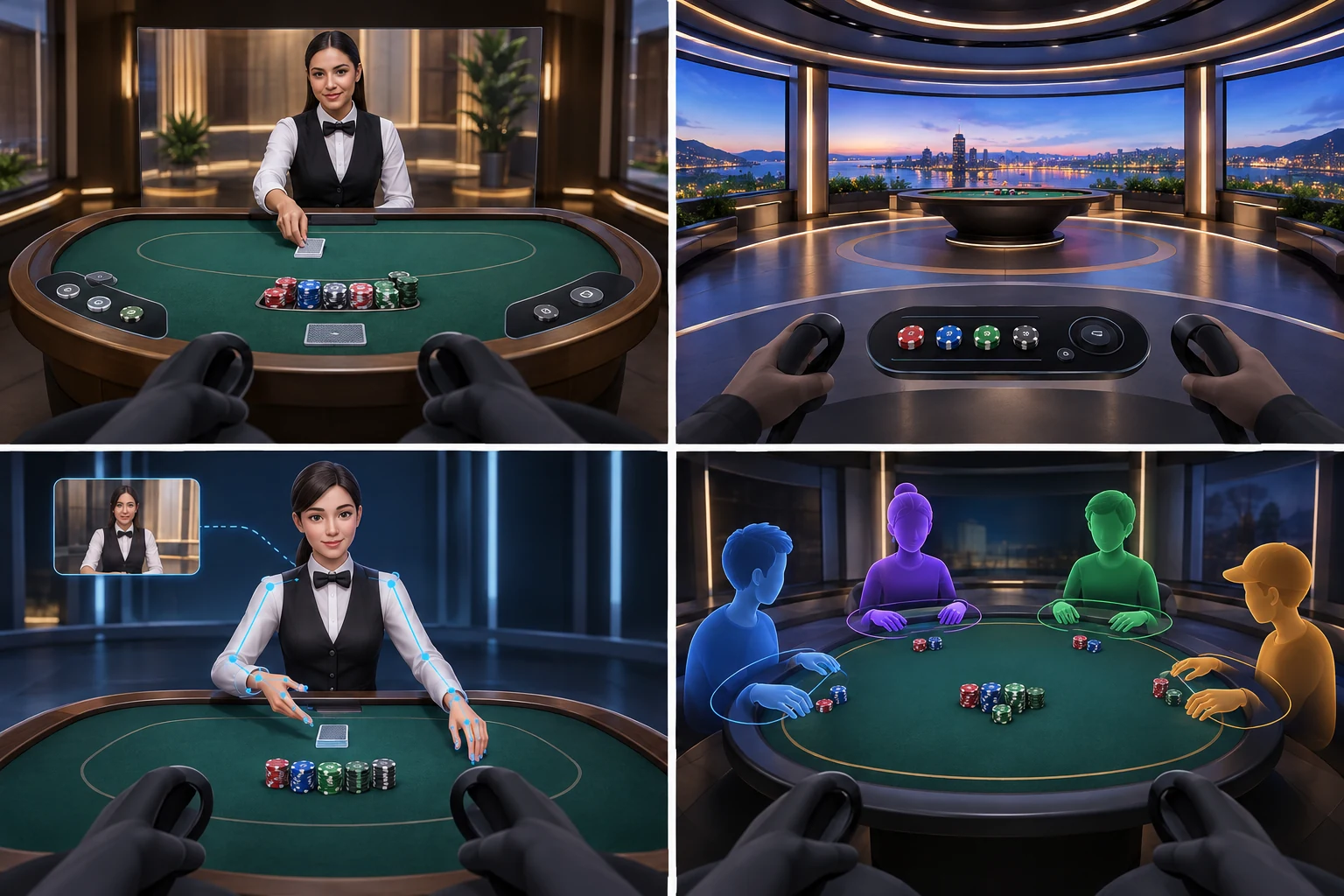
There is no single format for presenting a live dealer in VR. Product teams can combine video, rendered objects, and avatars in several ways.
1. Video dealer with a virtual table
In this model, the dealer remains a live video subject while the table, chips, controls, and surrounding room are rendered in 3D. The video may appear:
- on a floating screen;
- behind a virtual table;
- as a cut-out or keyed image;
- inside a reconstructed studio scene.
This approach preserves the visual credibility of a real person while allowing the betting interface to use depth, animation, and spatial controls.
Its main weakness is visual integration. Differences in lighting, scale, camera angle, resolution, or frame rate can make the dealer appear detached from the virtual room. A flat video plane may also become obvious when the player changes viewing position.
2. Immersive or 360-degree studio video
A panoramic camera can place the viewer inside a live studio feed. This gives a stronger sense of presence than a conventional rectangular stream, particularly when the player can look around the room.
However, panoramic video does not automatically support positional movement. Many implementations permit rotational viewing—looking left, right, up, or down—but cannot reconstruct the scene correctly if the player leans or moves around it. Interactive objects still need separate overlays or rendered controls.
Video quality is also demanding because a panoramic image spreads available resolution across the full field of view. Only part of that image is visible at any moment.
3. Live dealer represented by an avatar
A dealer’s actions can theoretically be mapped to a digital character using motion capture, tracked gestures, or animation triggered by game events. This provides consistent visual styling and allows the dealer to appear fully embedded in the environment.
The trade-off is authenticity. Facial expressions, hand movements, object contact, and conversational timing are difficult to reproduce convincingly. If the avatar’s motion does not match the dealer’s voice or the actual handling of cards and chips, the result can feel less live even when a human is controlling the session.
Products using this format must also make the role of the avatar clear. A digital character driven by software is not equivalent to a live human dealer represented through an avatar.
4. Player avatars around a shared table
Multiplayer presence may be represented through heads, hands, full-body avatars, or simple seat markers. These elements can make a table feel social, but they introduce moderation, privacy, performance, and comfort requirements.
A player avatar does not need photorealism to be useful. Accurate head orientation, hand position, and basic reactions may communicate attention more effectively than a visually detailed character with delayed or unnatural movement.
Latency and Action Synchronization
Latency is the time between an event occurring and the player perceiving or responding to it. In a VR live dealer game, there is no single latency measurement. Several timelines operate together:
- capture of dealer video and audio;
- video encoding and delivery;
- recognition or entry of game events;
- transmission of betting data;
- server confirmation;
- rendering of the virtual environment;
- tracking and display response inside the headset.
A smooth video stream can still be poorly synchronized with the game state. Conversely, the betting system may register actions promptly while the player sees delayed video.
Why synchronization matters
Consider a blackjack decision. The system may know that the player must choose an action, while the corresponding dealer video reaches the headset later. If the countdown begins according to server time but the prompt appears according to delayed video, the usable decision window becomes shorter than intended.
Roulette creates a similar problem. The displayed betting status, dealer announcement, physical wheel, and virtual interface must agree about when bets close and which result is final.
Events need an authoritative order
The experience should treat confirmed game events as authoritative rather than relying on the player’s video frame alone. A typical event sequence is:
- Betting opens.
- The interface enables valid wager controls.
- The player submits a wager.
- The system confirms or rejects it.
- Betting closes at a defined server-side time.
- The dealer completes the physical action.
- The result is captured and confirmed.
- The virtual table updates.
- Settlement is displayed.
The visual presentation may smooth transitions, but it should not change this underlying order. Animations must never imply that an unconfirmed bet was accepted or that a result is final before confirmation.
Practical methods for managing delay
Product-level techniques include:
- Timestamps: Video, audio, inputs, and game events carry timing information.
- Server-authoritative state: The session does not depend on the headset’s local clock for critical outcomes.
- Buffered presentation: A small controlled delay can keep video and data aligned, although it adds overall latency.
- Predictive interface behavior: Non-critical visual movement may be rendered locally while confirmation remains server-controlled.
- Visible status messages: “Submitted,” “accepted,” “betting closed,” and “reconnecting” should have distinct meanings.
- Recovery logic: After a connection interruption, the interface should restore the confirmed table state instead of guessing what happened.
The goal is not merely to minimize every delay. It is to make delay predictable, keep all channels aligned, and communicate the status of player actions accurately.
Devices and User Experience
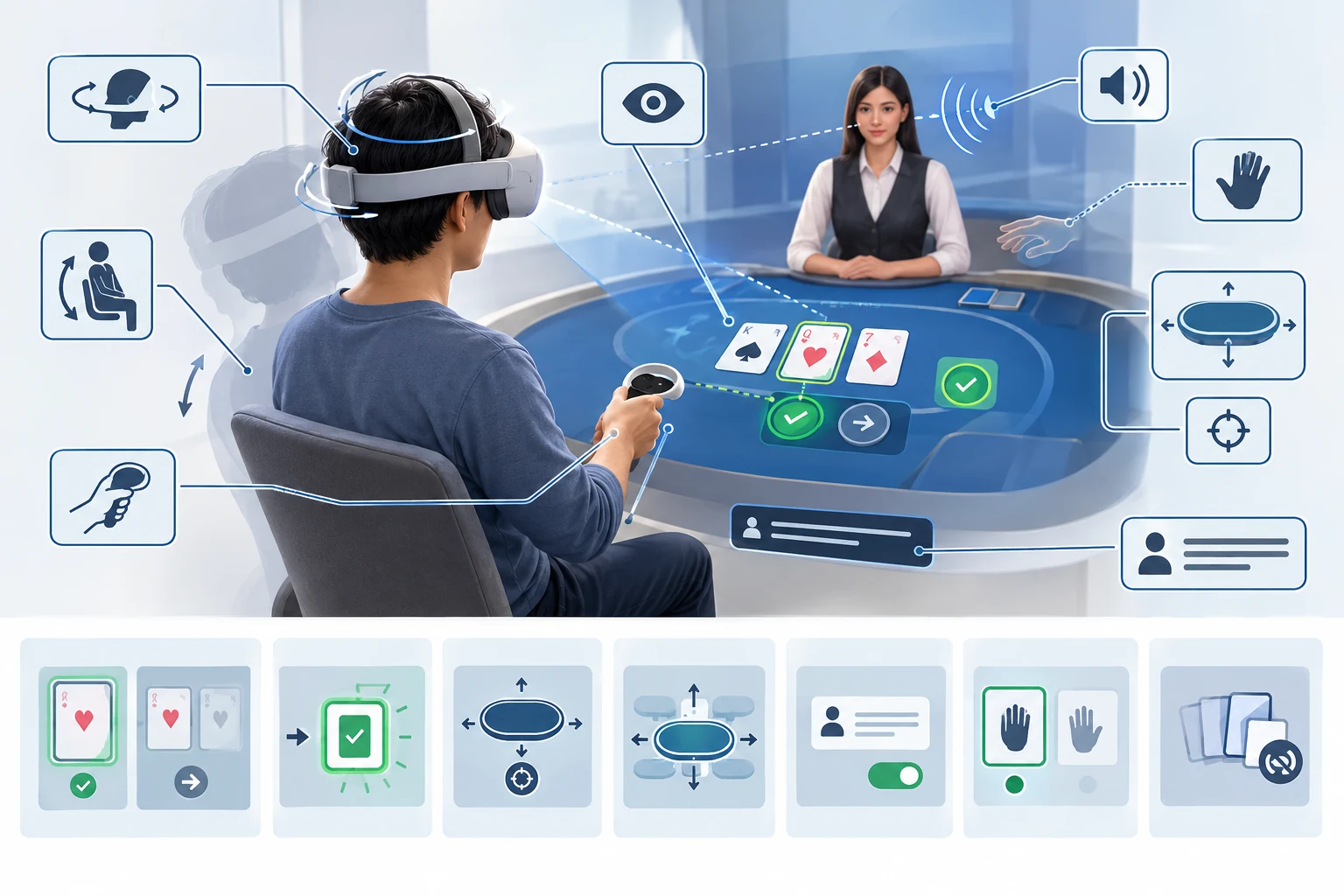
Headset capabilities affect both immersion and accessibility. A standalone headset has different performance and network constraints from a PC-connected device, while mobile phone viewers may offer only limited VR presentation.
Important device capabilities
| Capability | Effect on the experience |
|---|---|
| Head tracking | Keeps the environment stable as the player looks around |
| Positional tracking | Allows leaning or moving within the supported space |
| Tracked controllers | Supports pointing, selecting chips, and operating controls |
| Hand tracking | Can make interaction more natural but requires reliable gesture recognition |
| Eye tracking | May support gaze selection or rendering optimization on compatible devices |
| Spatial audio | Helps position the dealer, table sounds, and other participants |
| High-resolution display | Improves readability of cards, labels, and status information |
Device support should be stated precisely. “VR compatible” can mean anything from a stereoscopic video mode to a fully tracked application.
Controls must favor certainty over realism
Picking up a virtual chip may feel more immersive than pressing a button, but it also creates more opportunities for error. Critical actions need clear confirmation and should not depend on subtle gestures.
A usable interface should provide:
- readable bet values and balances;
- large, stable targets;
- a clear distinction between selection and submission;
- confirmation of accepted actions;
- alternatives to gesture-only controls;
- an accessible seated mode;
- easy recentering of the table and interface;
- warnings before leaving an active session.
Haptic feedback can reinforce a selection, but it should not be the only confirmation because not every device supports it and not every player can perceive it.
Comfort and accessibility
Casino tables are naturally suitable for seated VR, but comfort problems can still arise from camera movement, unstable video, small text, visual clutter, and long sessions.
Useful options include:
- adjustable table height and distance;
- subtitles or text alternatives for important speech;
- independent volume controls;
- high-contrast interface modes;
- dominant-hand selection;
- controller, gaze, and hand-tracking alternatives;
- reduced animation settings;
- non-VR access when practical.
Players must also be able to see essential account, session, and responsible-play controls without leaving the immersive environment unexpectedly.
Concepts, Demos, and Active Products
Claims about VR live dealer games require careful status labels. A promotional video, trade-show prototype, discontinued application, and currently accessible real-money product are not interchangeable evidence.
Implementation status definitions
| Status | What it means | Evidence to look for |
|---|---|---|
| Concept | A proposed experience or visual design | Renderings, design documents, announcements |
| Prototype | A limited working build used for testing | Controlled demonstrations or development footage |
| Demo | A publicly or privately demonstrated experience | Identifiable event, build, device, and demonstrated functions |
| Pilot | A restricted deployment with selected users or markets | Access conditions, testing period, supported hardware |
| Active product | A service currently available to eligible users | Working access path, current device support, jurisdiction and account requirements |
| Discontinued product | A previously available service no longer operating | Closure notice, removed application, or confirmed end of support |
A credible product claim should answer:
- Can eligible users access it now?
- Is the dealer genuinely live?
- Which headset and software version are supported?
- Are betting and game state integrated into VR?
- Is it real-money, social, or demonstration-only?
- In which jurisdictions is it available?
- When was its availability last verified?
Without those details, an implementation should not be presented as an active VR live dealer casino. Availability may change, and older media coverage does not establish current operation.
Benefits and Current Limitations
The potential benefits of VR live dealer technology include stronger spatial presence, more natural table layouts, social interaction, and clearer separation between simultaneous game elements. Virtual environments can also present contextual controls without physically modifying a studio.
The limitations are substantial:
- headset adoption is narrower than browser and mobile access;
- high-quality video requires stable bandwidth;
- VR interaction can be slower than touchscreen input;
- long sessions may cause fatigue or discomfort;
- device fragmentation increases testing requirements;
- avatars and live video can be difficult to combine convincingly;
- synchronization errors are more visible in an immersive setting;
- studio, product, and jurisdictional availability may be limited.
For that reason, VR is more likely to complement conventional live dealer interfaces than replace them outright.
Integrity, Privacy, and Session Safety
Immersion must not obscure the authoritative record of a game. Players need access to confirmed bets, results, transaction history, connection status, and applicable rules in a readable form.
Voice chat, spatial audio, and avatars introduce additional privacy considerations. Products should make it clear:
- whether other participants can hear the player;
- whether voice or interaction data is recorded;
- how another participant can be muted or reported;
- which profile information is visible;
- what happens when tracking or connectivity fails.
Security-sensitive actions should not rely solely on an avatar gesture or visual animation. Account authentication, wager confirmation, and session recovery require explicit states.
More extensive implementation considerations belong in the guide to VR casino integration.
How to Evaluate a VR Live Dealer Claim
Before treating a service as a functioning VR live dealer product, check the following:
- [ ] A human dealer is demonstrably live.
- [ ] The VR environment does more than display a flat stream.
- [ ] Bets and game events are synchronized with the dealer feed.
- [ ] Supported headsets and control methods are named.
- [ ] Current access can be independently verified.
- [ ] Real-money, social, demo, and prototype modes are clearly distinguished.
- [ ] Jurisdiction and eligibility restrictions are disclosed.
- [ ] Connection failures and unconfirmed actions have clear handling.
- [ ] Essential rules, balances, and status messages remain readable in VR.
- [ ] The availability date or verification date is recent and explicit.
The defining feature is not visual spectacle. A genuine VR live dealer system must preserve the reliability and clarity of a live game while adding meaningful spatial interaction. Until video, state, controls, and timing work as one coherent experience, the result is better described as an immersive stream, prototype, or VR viewing mode—not a complete live dealer casino in VR.