VR casino technology combines a three-dimensional gaming environment with motion tracking, spatial interfaces, real-time networking, casino game systems, and—in some products—live video or real-money account services. Instead of interacting with a flat game screen, a player can look around a virtual venue, move between tables, use tracked controllers or hands, and communicate with other participants through an avatar.
A complete VR casino is therefore more than a collection of games. It is a connected technology stack that must coordinate:
- A headset, computer, phone, or compatible browser
- A native application or browser-based immersive experience
- 3D graphics, audio, physics, and user-interface systems
- Head, controller, hand, and sometimes eye tracking
- Multiplayer sessions, avatars, and voice communication
- Game rules, random outcomes, or live-dealer feeds
- Player accounts, payments, identity controls, and responsible-gambling tools where applicable
- Security, moderation, analytics, and operator systems
Not every VR casino uses every layer. A social casino may offer virtual chips without financial transactions, while a real-money product may need to connect an immersive front end to regulated account and gaming services. Some experiences focus on realistic casino floors; others use VR simply to make individual games more spatial and interactive.
How VR Casino Technology Works
In practical terms, a VR casino translates a player’s physical actions into events inside a shared digital venue. When the player turns their head, reaches toward a chip, selects a menu, or speaks to another participant, the system interprets that input and updates the virtual environment.
A typical session follows this sequence:
-
The player opens the experience.
This may happen through an installed VR application or a compatible web browser. -
The device establishes tracking.
The headset determines the player’s viewing direction and position. Controllers or hand tracking may provide additional input. -
The rendering engine creates the scene.
The application draws the casino floor, tables, cards, chips, avatars, menus, lighting, and visual effects from the player’s perspective. -
The game system processes actions.
Bets, card selections, spins, table interactions, and other inputs are validated according to the game’s rules. -
Network services synchronize the session.
In a multiplayer environment, the platform shares relevant positions, gestures, voice data, and game events with other participants. -
Back-end services maintain the player state.
Accounts, preferences, virtual balances, session records, and permitted game access may be managed outside the VR scene. -
The interface delivers feedback.
Visual movement, spatial sound, controller vibration, animations, and status messages show the result of each action.
The underlying casino logic does not have to run entirely inside the headset. In many systems, the headset or browser handles presentation and input while remote services manage accounts, multiplayer state, game sessions, content, and security-sensitive operations.
The VR Casino Technology Stack
The ecosystem is easiest to understand as a set of connected layers.
| Technology layer | Primary role | Typical components |
|---|---|---|
| Access and delivery | Opens and distributes the experience | Native VR app, desktop client, mobile companion app, immersive browser session |
| Device and input | Captures player movement and commands | Headset tracking, controllers, hand tracking, gaze input, keyboard or gamepad |
| Presentation | Creates the virtual venue | 3D engine, lighting, animation, spatial audio, interface elements |
| Interaction | Turns movement into meaningful actions | Object selection, chip handling, menus, locomotion, accessibility controls |
| Game layer | Applies the rules and resolves play | Table-game logic, slot mechanics, virtual currency, random outcomes, live-game state |
| Social and multiplayer | Connects participants | Avatars, matchmaking, shared rooms, voice chat, presence, moderation |
| Platform services | Maintains the wider product | Accounts, identity, balances, content management, notifications, analytics |
| Operational controls | Supports safe and reliable use | Security monitoring, permissions, support tools, jurisdiction controls, responsible-gambling features |
These layers can come from one platform or several connected technology providers. The player generally sees a single virtual environment, even when multiple systems are working behind it.
Front end and back end
The front end is the part the player sees and controls: the casino floor, tables, menus, avatars, and interactive objects. It must respond quickly to head movement because visual delays or uneven performance can make an immersive experience uncomfortable.
The back end manages services that do not need to be rendered inside the virtual world. Depending on the product, these can include account status, game availability, session records, multiplayer rooms, content updates, and transaction-related functions.
The distinction matters because VR is primarily an interface and presentation layer. It can change how a casino game feels without replacing the established systems that control the game, account, or live session.
Client and server responsibilities
A VR client typically handles:
- Rendering the player’s current view
- Reading headset and controller input
- Playing audio and animation
- Displaying menus and game information
- Predicting or smoothing some movement for responsiveness
Server-side systems may handle:
- Authoritative game events
- Multiplayer room state
- Account and session data
- Access permissions
- Content configuration
- Security checks and activity records
The exact division varies by product. A single-player simulation can work with limited networking, while a shared real-money environment depends much more heavily on reliable server communication.
Native VR and Browser-Based VR
There are two main delivery models: installed native applications and browser-based immersive experiences. Hybrid products may use both.
Native VR applications
A native VR application is installed for a particular operating system or device platform. It can usually make direct use of the platform’s supported rendering, tracking, controller, storage, and performance features.
Native delivery is often suited to experiences that need:
- Detailed 3D environments
- Complex interactions
- Consistent headset and controller support
- Extensive local assets
- Platform-specific performance tuning
- Longer, feature-rich sessions
The trade-off is distribution friction. Players may need to find the application, download a substantial package, create or connect an account, and install updates. Developers must also maintain compatibility with the platforms they support.
Browser-based VR and WebXR
Browser-based VR delivers an immersive scene through web technologies. WebXR is the family of browser interfaces used to connect compatible web experiences with immersive hardware and input.
A browser experience can reduce the distance between a link and a playable session. It may also serve conventional screens when a headset is unavailable. However, actual capabilities depend on the device, browser, operating system, permissions, and the design of the experience.
Browser-based delivery is commonly considered for:
- Lightweight demonstrations
- Virtual lobbies or showrooms
- Promotional experiences
- Cross-device entry points
- Games with relatively modest scene complexity
- Sessions that benefit from link-based access
Web delivery does not automatically make a product device-independent. Input methods, graphics performance, browser support, and headset features still vary. For a closer look at the browser layer, see the WebXR casino technology guide.
Native VR versus browser VR
| Comparison dimension | Native VR | Browser-based VR |
|---|---|---|
| Access | Installed application | Opened through a compatible browser |
| Initial friction | Download and installation are usually required | A link can provide a faster entry point |
| Hardware access | Can use platform-supported features directly | Depends on browser and WebXR support |
| Performance control | Greater scope for platform-specific optimization | Must operate within browser and device constraints |
| Updates | Distributed through app or platform update systems | Web content can be updated centrally |
| Typical scope | Rich, persistent environments | Lightweight or broadly accessible experiences |
| Compatibility work | Multiple application builds may be needed | Browser differences and device support still require testing |
Neither model is universally better. The right choice depends on the desired visual quality, session length, target devices, distribution strategy, and interaction design.
VR is also distinct from augmented reality and mixed reality. VR generally replaces the user’s visible surroundings, while AR and MR place digital elements into a view of the physical world. The VR, AR, and MR comparison explains where those categories overlap and differ.
Devices, Graphics, Tracking, and Performance
The quality of a VR casino session depends on more than the visual design. The device must track movement, render the world responsively, present readable information, and support reliable interaction.
Headsets and computing models
VR headsets generally operate in one of two broad ways:
- Standalone headsets contain the computing hardware needed to run compatible experiences.
- Connected headsets use a separate computer or another host device for much of the processing.
This distinction affects how much rendering power is available, how the application is distributed, and how freely the player can move. It does not, by itself, determine the quality of an experience. Efficient software can be more important than visual complexity alone.
Headsets also differ in tracking methods, supported controllers, field of view, display characteristics, passthrough functions, and ergonomics. Those differences influence design, but detailed model-by-model purchasing comparisons belong in the VR headset guide.
Tracking and input
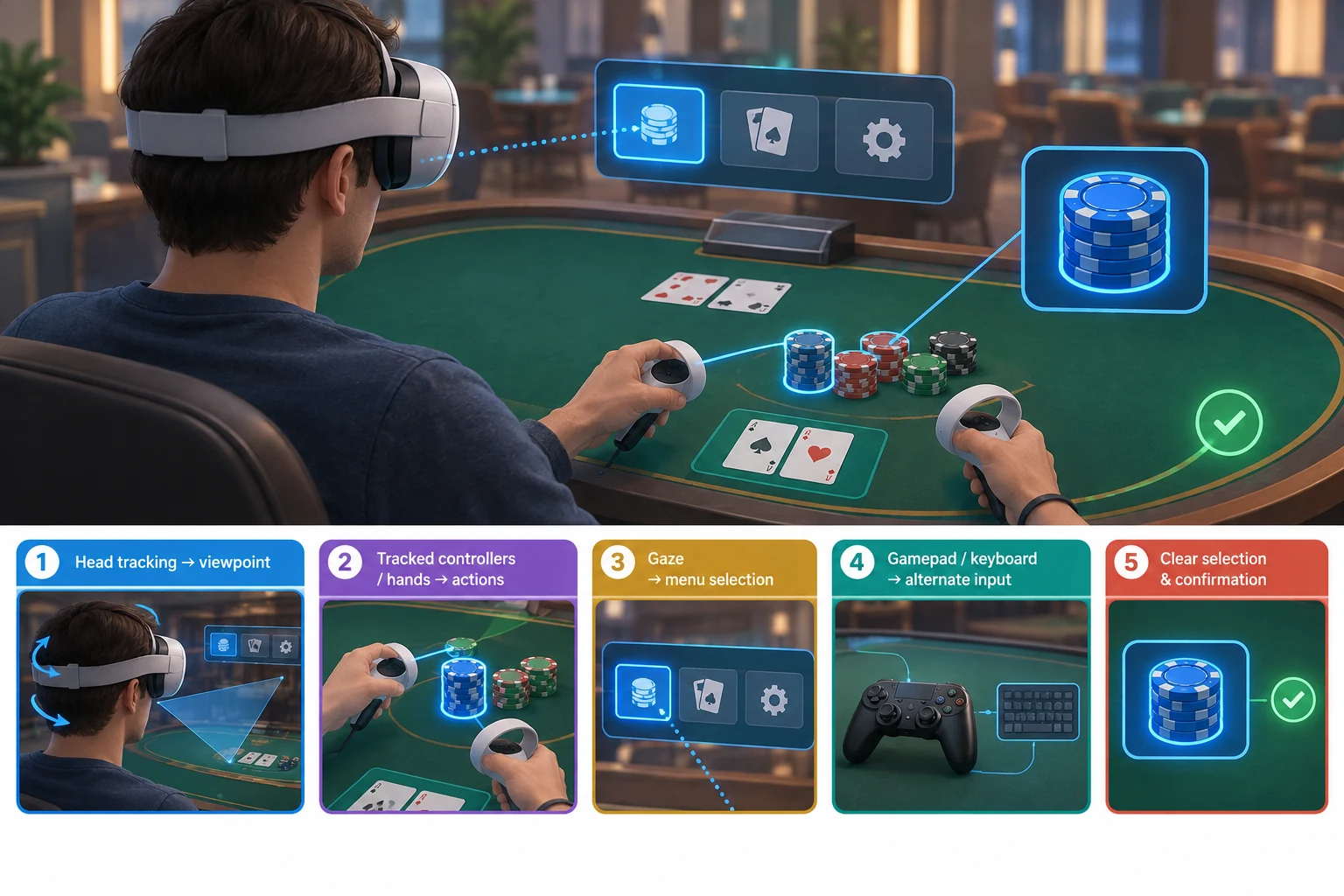
Tracking gives the virtual world a stable relationship to the player’s movement. Common input categories include:
- Head tracking: Updates the view as the player looks around or changes position.
- Controller tracking: Represents hand position and provides buttons, triggers, sticks, or touch surfaces.
- Hand tracking: Uses sensors to estimate hand and finger positions without a controller.
- Gaze input: Uses head direction or eye tracking, where supported, to identify what the player is looking at.
- Conventional input: Keyboard, mouse, touchscreen, or gamepad controls may support non-VR access or specific tasks.
Casino interactions introduce precision challenges. Cards, chips, buttons, and betting areas can be small. An interface that imitates physical objects too literally may become difficult to use if tracking is imperfect or if the player has limited space. Effective design often combines natural gestures with clear selection states, enlarged targets, and optional menus.
Graphics and scene design
A VR casino may include reflective surfaces, animated machines, crowds, lighting effects, cards, chips, and multiple tables. Rendering all of these elements from a moving first-person viewpoint can be demanding.
Designers manage the workload by controlling:
- The number and complexity of visible 3D objects
- Texture and lighting detail
- Character animation quality
- Reflections, shadows, and particle effects
- The distance at which detailed objects are rendered
- The number of avatars and interactive items in a room
- The resolution and frequency of visual updates
Readability is as important as realism. Players must be able to distinguish cards, table limits, balance information, controls, and game status without excessive head movement. A visually impressive venue can still fail if essential information is hard to read.
Performance and comfort
VR performance is experienced physically as well as visually. Irregular frame delivery, delayed tracking response, abrupt camera movement, or unstable networking can reduce comfort and trust.
Useful performance priorities include:
- Keeping head movement and visual response closely aligned
- Avoiding unnecessary camera motion
- Providing seated and standing options where appropriate
- Offering more than one movement method
- Keeping important controls within a comfortable reach
- Making text legible without requiring the player to lean forward
- Preserving clear feedback during network delays
- Allowing users to adjust audio, movement, and visual settings
Teleportation, direct movement, snap turning, and stationary table modes can serve different preferences. There is no single locomotion method that works equally well for every player.
Multiplayer, Avatars, and Live Interaction
Multiplayer technology turns a VR casino from a private game interface into a social venue. Participants can occupy the same virtual room, observe shared events, communicate, and interact around a table.
Shared session synchronization
A multiplayer system must decide which information needs to be sent to other participants. This may include:
- Avatar head and hand positions
- Seat occupancy
- Game actions and outcomes
- Table status
- Gestures or emotes
- Voice communication
- Entry, exit, and connection state
Not every movement needs to be transmitted with identical precision. Systems can prioritize events that affect the game while smoothing less critical avatar motion. The game state must remain clear even if one participant experiences a temporary connection problem.
Avatars and presence
An avatar represents the player in the virtual environment. It may range from a head-and-hands representation to a full animated body.
The avatar layer supports several purposes:
- Showing where another participant is looking or pointing
- Making conversation feel spatial
- Identifying who is seated at a table
- Expressing reactions through gestures or animations
- Giving players a persistent visual identity
Avatar motion is an approximation based on the tracking data available. A headset and two controllers do not directly measure every joint in the body, so animation systems infer missing movement. The result should communicate intent without distracting from gameplay.
Identity design also requires care. Display names, avatar customization, account identity, and real-money verification are separate concepts. A public avatar does not need to expose sensitive account information.
Voice, spatial audio, and moderation
Spatial audio places sound according to its source in the virtual environment. At a table, it can help players understand who is speaking and where activity is happening. Ambient sound can also make a venue feel active.
Social audio creates operational requirements, including:
- Mute and volume controls
- Personal-space settings
- Reporting and blocking tools
- Table or room permissions
- Moderation workflows
- Clear indicators for microphone status
These controls are not optional extras in a social environment. They shape whether shared spaces remain understandable and usable.
Live-Dealer VR
Live-dealer VR connects an immersive interface with a game conducted by a human dealer or presenter. The player may watch a video stream inside a virtual table environment while placing bets through interactive VR controls.
This is different from a fully computer-generated table. The virtual environment still handles navigation, interface elements, player position, and potentially social presence, but the live game depends on synchronized video and game data.
A live-dealer VR session may combine:
- A live video feed
- Encoded game-state information
- Betting controls and timers
- A virtual table or studio setting
- Dealer audio
- Player account and balance data
- Connection-status feedback
Synchronization is critical. The interface must show the correct betting phase and result in relation to the live stream. If the video, controls, and recorded game state appear to disagree, the experience becomes confusing.
The production model can also vary. Video may be displayed on a virtual screen, mapped into a 3D table scene, or combined with digitally rendered elements. Each approach creates different requirements for bandwidth, visual integration, and interaction design.
For a focused explanation of streaming, synchronization, interfaces, and virtual studios, visit the live-dealer VR technology guide.
How VR Connects to Casino Platforms
VR is usually one channel within a larger product rather than an isolated system. The immersive experience may need to exchange information with existing services while presenting it in a form suited to a headset.
High-level connection points can include:
- Player sign-in and session management
- Game catalog and availability
- Virtual or real-money balances
- Betting and game-session services
- Live-dealer platforms
- Content and promotion systems
- Customer support
- Security and fraud monitoring
- Analytics and technical diagnostics
- Responsible-gambling controls
The important principle is separation of concerns. The VR scene should display information clearly and capture player intent, while authoritative platform services validate actions and maintain relevant records.
Integration becomes more complex when a product must support VR, desktop, and mobile access to the same account or game catalog. Each channel has different interface needs, but the underlying player state must remain coherent.
This article does not cover implementation architecture or deployment planning. Operators and technology teams can continue to the dedicated VR casino integration overview for that subject.
Technical and Product Limitations
VR can create a strong sense of presence, but it also introduces constraints that conventional web and mobile interfaces may avoid.
Hardware access and setup
Players need compatible hardware, enough physical space, and familiarity with the controls. Installation, permissions, account linking, and device updates can add friction before play begins.
Comfort and accessibility
Some users cannot or prefer not to use head-mounted displays. Others may need seated play, reduced motion, subtitles, alternative input, color adjustments, or simplified controls. A non-VR route can therefore remain important even when immersion is the product’s main feature.
Network dependence
Multiplayer and live-dealer products depend on stable communication. Connection problems may affect voice, avatar motion, video, or game-state updates differently. The interface should distinguish a visual interruption from an unresolved game action.
Interface density
Casino products often display balances, bets, limits, timers, rules, histories, and account controls. Placing all of this information in a three-dimensional scene can create clutter. Critical information must remain visible without overwhelming the player.
Privacy and sensor data
Immersive devices can generate movement and interaction data. Products should minimize unnecessary collection, protect account information, and explain relevant permissions in terms users can understand. Social features also need privacy controls for voice, identity, and visibility.
Real-money requirements
When real-money play is involved, the immersive interface still has to support the controls required by the relevant operator and market. Availability can vary by location, platform, age eligibility, and product authorization. VR presentation does not remove the need for identity, payment, security, or responsible-gambling processes.
What Defines a Strong VR Casino Experience?
A technically successful VR casino should do more than look realistic. It should make the state of the game, the meaning of an action, and the status of the player’s session consistently clear.
Use this checklist when assessing an experience:
- [ ] Head and hand input feels responsive.
- [ ] Cards, chips, buttons, and text are easy to read.
- [ ] The player can use seated or comfortable interaction modes.
- [ ] Game actions have clear visual and audio confirmation.
- [ ] Connection problems are communicated without hiding session status.
- [ ] Multiplayer voice and avatar controls are easy to find.
- [ ] Mute, block, report, and personal-space tools are available where needed.
- [ ] Account and balance information is separated from public avatar identity.
- [ ] Essential controls do not depend on precise gestures alone.
- [ ] The experience provides an accessible route into and out of VR.
- [ ] Live video, betting windows, and game results remain synchronized.
- [ ] The visual environment supports gameplay instead of obscuring it.
VR Casino Technology Guide Map
Use these specialist guides to explore each part of the ecosystem without losing the high-level context:
- WebXR casino technology: How browser-based immersive access works, where it fits, and what limits compatibility.
- VR vs. AR vs. MR: A clear comparison of fully virtual, overlaid, and blended environments.
- VR headsets for casino experiences: Device categories, compatibility considerations, tracking, comfort, and other selection criteria.
- Live-dealer VR technology: How video, game data, virtual tables, and player interaction come together.
- VR casino integration: A separate operator-focused overview of connecting immersive experiences with casino platforms and services.
Together, these topics form the core VR casino ecosystem: delivery through native applications or the web, access through compatible hardware, responsive graphics and tracking, social presence, live-game synchronization, and connections to the broader casino platform.
Common Questions About VR Casino Technology
Does a VR casino always require a headset?
No. A product may offer both immersive and conventional screen modes, particularly when it uses web technology or a shared cross-device platform. Full head-tracked VR requires compatible hardware, but related 3D environments can also be presented on desktop or mobile screens.
Are all VR casinos real-money casinos?
No. Some use virtual currency or simulated games and focus on entertainment or social interaction. Others may connect to real-money casino services where the operator, platform, and player are eligible. The visual format alone does not determine whether financial wagering is involved.
Can VR casino players use different devices in the same room?
Potentially, if the product is designed for cross-device multiplayer. The platform must account for different controls, performance levels, and interface capabilities. A headset user may interact through tracked hands, while a desktop participant uses a mouse or gamepad.
Is WebXR the same as a native VR app?
No. WebXR enables immersive experiences through compatible browsers, while native applications are installed for a device platform. They can present similar environments, but distribution, performance control, update methods, and hardware access differ.
What is the most important technical requirement?
There is no single requirement, but responsive tracking and an unambiguous game state are foundational. High visual detail cannot compensate for uncomfortable motion, unreadable controls, uncertain bets, or poorly synchronized multiplayer events.