A WebXR casino delivers an immersive or three-dimensional experience through a compatible web browser rather than requiring a conventional native VR application. The browser loads the casino interface, checks whether an XR session is supported, requests the necessary permission, and connects the page to the headset’s display, tracking, and input systems.
The practical benefit is low-friction access: a player can open a secure URL and enter VR from the page. The trade-off is that successful delivery depends on the entire browser–device–runtime combination. A browser-based casino may work in ordinary 2D mode while failing to offer immersive VR on the same device.
Compatibility guidance last reviewed: March 2025. WebXR support changes between browser, operating-system, device, and firmware versions. Feature detection on the actual target device is more reliable than a static browser-support list.
What WebXR Means for Online Casinos
WebXR is a collection of browser APIs that allows a website to communicate with compatible virtual-reality and augmented-reality hardware. In a casino context, it can provide access to head tracking, controller input, stereoscopic rendering, and spatial reference systems from a web page.
WebXR is a delivery layer, not a complete casino platform. It does not provide:
- Casino accounts or identity verification
- Payments, deposits, or withdrawals
- Game logic or random-number generation
- Multiplayer infrastructure
- Responsible-play controls
- Licensing or jurisdiction checks
- Security certification
- A ready-made virtual environment
Those systems must exist separately and be integrated with the browser experience.
The three relevant session modes
A WebXR implementation can request different session types:
- Inline: Three-dimensional content appears inside a normal browser page without taking control of an XR display.
- Immersive VR: The browser renders a stereoscopic environment through a VR headset and receives tracked pose or controller data.
- Immersive AR: Digital content is presented in relation to the user’s physical surroundings on supported devices.
For a browser-based VR casino, immersive-vr is normally the defining mode. Inline rendering remains important because it can provide a preview or fallback when an immersive session is unavailable.
How the browser fits into the technical stack
A working experience usually involves several layers:
- The casino web application loads account, lobby, game, and interface data.
- A JavaScript rendering layer or web engine creates the three-dimensional scene.
- The WebXR Device API requests an XR session and supplies tracking information.
- The browser mediates permissions and communicates with the device’s XR runtime.
- The XR runtime and headset provide display, pose, and input capabilities.
- Backend services handle authentication, game state, transactions, and multiplayer functions where applicable.
Failure at any layer can prevent immersive mode even if the underlying website remains accessible.
For broader coverage of rendering stacks and immersive delivery, see the VR technology section. WebXR’s specific role is browser access rather than the complete technology behind a casino.
Browser, Device, HTTPS, and Permission Requirements
A WebXR page needs more than a browser that recognizes the API. The browser, device, operating system, runtime, graphics stack, site configuration, and requested session mode must all be compatible.
Core requirements
| Requirement | Why it matters | What to verify |
|---|---|---|
| Secure HTTPS origin | WebXR features are restricted to secure contexts | The page and required assets load over HTTPS without certificate errors |
| WebXR-capable browser | The browser must expose the relevant WebXR APIs | navigator.xr exists and the desired session mode passes a support check |
| Compatible XR device and runtime | The browser needs access to tracking, display, and input systems | The headset is recognized and its XR runtime is active |
| User-initiated session request | Browsers generally require a deliberate action before entering immersive mode | “Enter VR” is triggered by a click, tap, or controller action |
| Permission to use XR features | Spatial tracking and related features may require browser approval | The user has not denied or blocked the permission |
| Suitable graphics support | The scene must be rendered at an acceptable frame rate | WebGL, shaders, textures, and memory use work on the target hardware |
| Supported input model | Controllers and hand input vary by device | Essential actions remain available with the target input hardware |
| Correct iframe policy | Embedded experiences can be restricted by browser policy | Cross-origin frames have the appropriate permissions configuration |
Local development environments may receive secure-context exceptions for testing, but a public deployment should use HTTPS throughout.
Browser support is a combination, not a yes-or-no label
A browser name alone does not establish compatibility. Two browsers based on the same engine can expose different WebXR modules, runtime connections, permission behavior, or device integrations.
| Browsing environment | Likely role | Main uncertainty |
|---|---|---|
| Browser built for a standalone XR headset | Primary environment for immersive browser sessions | Firmware, browser version, supported modules, and controller behavior |
| Desktop browser connected to an XR runtime | Possible immersive environment | Browser, operating system, graphics driver, runtime, and headset must interoperate |
| Mobile browser on a phone or tablet | Inline 3D and, on some combinations, immersive AR | Mobile WebXR support does not automatically provide headset-based VR |
| Browser without an active XR device | Standard 2D or inline presentation | An immersive session will normally be unavailable |
| Embedded browser or in-app webview | Potentially restricted web experience | WebXR, pop-ups, cookies, permissions, or graphics features may be disabled |
Chromium-derived headset browsers are common targets for WebXR development, but a shared browser engine does not guarantee identical behavior. Other specialist XR browsers may also implement WebXR. Desktop and mobile support is more fragmented, so production sites should test exact combinations rather than relying on engine family alone.
Use feature detection before showing “Enter VR”
A page should determine whether the browser exposes WebXR and then ask whether the intended session mode is supported. Conceptually, the application checks:
- Is
navigator.xravailable? - Does
isSessionSupported("immersive-vr")resolve successfully? - Are any optional features required by the experience available?
- Can
requestSession("immersive-vr")begin after a user action?
A positive support check is necessary but not sufficient. The session request can still fail because permission was denied, no device is active, the runtime is unavailable, or the browser’s state changed.
The interface should therefore distinguish among:
- WebXR unavailable
- Immersive VR unsupported
- Headset or runtime not detected
- Permission denied
- Session failed to start
- Session ended unexpectedly
A generic “VR error” gives users and support teams too little information.
Permissions and embedded content
XR access should be requested at the moment the user intentionally enters immersive mode, not immediately when the page loads. The page must also handle rejection without trapping the user.
Embedding introduces another compatibility layer. If the XR experience runs in an iframe, especially one served from a different origin, the parent page’s Permissions Policy can prevent spatial tracking. Authentication cookies, storage rules, content-security settings, and cross-origin asset restrictions can also affect the experience even when WebXR itself is available.
For that reason, an immersive casino should not assume that a game working as a top-level page will behave identically inside an operator portal.
Typical WebXR Casino User Flow
The following flow describes how browser-based access can work. It is a format example, not confirmation that any specific casino currently implements every step.
-
The player opens a secure casino URL.
The initial page loads as a conventional two-dimensional interface so it remains usable without XR. -
The site performs a capability check.
It checks browser APIs, the desired session mode, graphics support, and any essential input requirements. -
The user signs in through an accessible interface.
Authentication can remain in the normal page rather than being forced into a virtual keyboard or three-dimensional form. -
The browser displays an “Enter VR” option when appropriate.
If immersive mode is unavailable, the page presents a clear 2D fallback instead of a non-functional button. -
The user initiates the XR session.
The browser may display a permission prompt or require the user to continue inside the headset. -
The application creates the immersive scene.
It connects rendering to the XR session, establishes a reference space, and activates the supported input method. -
The user navigates the lobby or game area.
The interface may use controller rays, direct interaction, gaze-assisted targeting, hand input, or a combination supported by the device. -
Sensitive or complex actions receive explicit confirmation.
Bets, balance changes, account settings, and session exits should not rely on ambiguous gestures. -
The application handles interruption or session exit.
Removing the headset, losing tracking, switching tabs, or ending the XR session should return the user to a stable browser state.
This progressive flow keeps the website functional when immersive access fails. It also separates account and transaction tasks from the more performance-intensive three-dimensional environment.
Possible Browser-Based Casino Formats
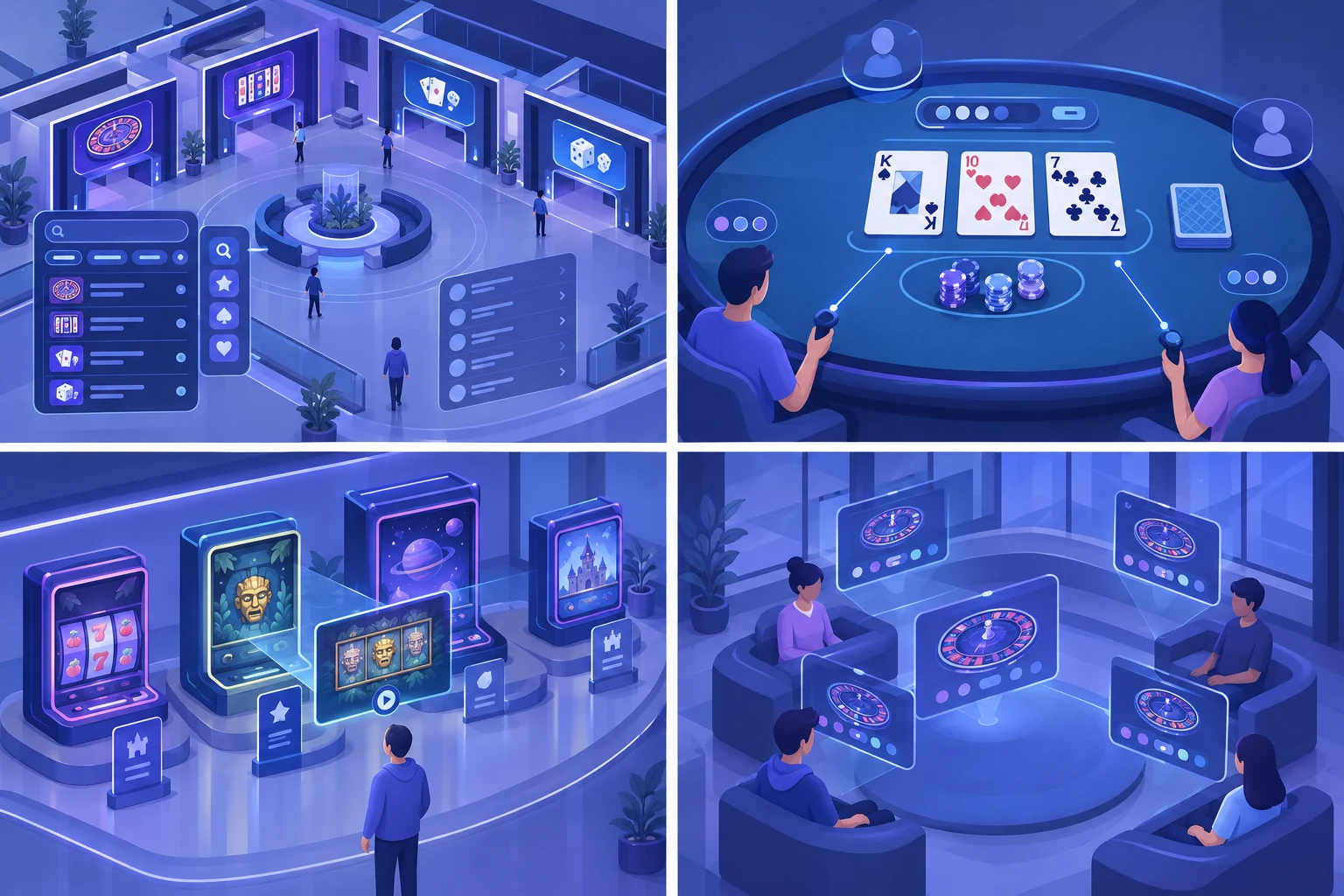
WebXR can support several presentation patterns, depending on the game architecture and available device features.
Virtual lobby
A three-dimensional lobby can organize games as rooms, tables, or interactive displays. This format makes spatial discovery possible, but it also adds navigation time and rendering cost. Search, filters, and a direct game list should remain available.
Immersive table interface
A table game can place cards, chips, controls, and status information within a tracked scene. Essential values must remain legible at common viewing distances, and input should not depend on highly precise hand movements.
Three-dimensional game showroom
A browser experience can present game cabinets or themed areas while launching the underlying game in a panel, layer, or separate interface. This can reduce the need to rebuild every game as a fully spatial application.
Shared social space
A virtual room can potentially display avatars or shared game-state information. This requires additional networking, moderation, privacy, synchronization, and failure-handling systems beyond WebXR itself.
These examples describe technical formats, not verified features of named operators. An operator review—such as the separate CryptoSlots casino overview—should not be treated as evidence that immersive WebXR support exists unless that capability is explicitly documented and tested.
WebXR vs Native VR Applications
Neither delivery model is universally better. WebXR prioritizes browser access and cross-platform web deployment; native applications can provide deeper platform integration and tighter performance control.
| Comparison dimension | WebXR browser experience | Native VR application |
|---|---|---|
| Entry method | Open a URL and start from the browser | Install and launch an application |
| Updates | Deployed on the server and available on reload | Distributed through an application update process |
| Platform reach | One web codebase can target multiple compatible environments | Builds and integrations may be platform-specific |
| Hardware access | Limited to browser and WebXR-exposed capabilities | Can use platform APIs available to the native application |
| Performance control | Constrained by browser memory, graphics, and scheduling behavior | Greater control over rendering and platform optimization |
| Discoverability | Can be linked from search, messages, or other web pages | Usually reached through a store, library, or direct installation |
| Storage footprint | Assets can be streamed and cached as web content | Application assets are commonly installed locally |
| Offline use | Limited unless explicitly designed and cached | More practical for installed assets, although casino services may still require connectivity |
| Interface integration | Can combine DOM-based pages with immersive scenes | Uses the native application’s interface framework |
| Compatibility burden | Browser, runtime, device, permissions, and web engine | Operating system, device, store, runtime, and application build |
| Release control | Faster web deployment, subject to browser behavior | More controlled binary, subject to platform distribution rules |
A common design compromise is to use the web page for discovery, authentication, help, and account controls, while reserving WebXR for the immersive game or lobby. This avoids reproducing every form and administrative screen inside a 3D environment.
Compatibility and Performance Limitations
Performance must be sustained, not merely demonstrated
A scene that loads successfully can still be unsuitable for extended use. XR rendering must produce separate views and respond quickly to head movement. Performance can deteriorate because of:
- Excessive geometry
- Large or numerous textures
- Complex real-time lighting
- Expensive transparency and post-processing
- Too many animated objects
- Frequent network-driven scene updates
- JavaScript work competing with rendering
- Memory pressure and garbage collection
- Thermal or battery constraints on standalone devices
A visually rich lobby may therefore need stricter asset budgets than its desktop 3D equivalent. Level-of-detail systems, compressed assets, baked lighting, object pooling, and conservative effects can reduce the load, but results still require device testing.
Web engines do not expose identical XR features
Libraries and engines can simplify scene construction, yet they cannot remove browser differences. An engine may support basic headset presentation while requiring extra work for:
- Controller profiles
- Hand tracking
- Teleportation or smooth locomotion
- Passthrough or augmented-reality features
- Spatial anchors
- Depth information
- Scene understanding
- Hit testing
- Foveation controls
- Layers or composition features
Exporting a project to the web also does not guarantee that all native engine features will survive unchanged. Plugins, shaders, networking code, audio behavior, file access, and memory assumptions may need browser-specific adaptation.
Optional WebXR modules should be treated as enhancements unless they are essential and verified across every supported target. A casino should not advertise “hand tracking,” for example, merely because its engine contains a hand-input component.
Input varies across devices
WebXR can expose standardized input concepts, but physical controls differ. A user may have tracked controllers, hands, a single pointer, gaze selection, or a partially supported input profile.
Robust interfaces should:
- Provide large, stable targets
- Avoid gesture-only critical actions
- Show which object is selected before activation
- Offer undo or confirmation where appropriate
- Keep seated interaction practical
- Avoid requiring wide physical movement
- Support a non-immersive route for account recovery and assistance
- Preserve functionality when an optional input feature disappears
For information about device classes and their interaction differences—not purchasing recommendations—see VR headset compatibility considerations.
Text entry remains a friction point
Passwords, payment details, search queries, and support messages can be cumbersome in VR. Virtual keyboards vary by runtime, and browser focus behavior may not always match a conventional desktop experience.
Where possible, a WebXR casino should minimize immersive text entry. Existing browser sessions, short selection-based flows, device pairing, or a return to the 2D page can be more dependable than placing every form inside the scene.
Network quality affects more than loading
The initial asset download is only one network concern. Casino interfaces may depend on authentication refreshes, balance updates, game-state messages, live data, and multiplayer synchronization. An immersive scene must define what happens when these services are delayed or disconnected.
The application should not leave stale controls active when the authoritative game state is unknown. It should display a clear connection state, prevent duplicated actions, and recover into a known interface when communication resumes.
Accessibility requires a parallel strategy
A spatial interface can create barriers involving motion, reach, vision, hearing, precision, and orientation. Useful controls include:
- Seated mode
- Adjustable text and interface scale
- High-contrast presentation
- Captions for meaningful audio
- Reduced motion options
- Snap turning or alternative locomotion
- Volume controls
- Controller remapping where supported
- A complete 2D path for essential account functions
Accessibility cannot be inferred from WebXR support. It must be designed and tested independently.
Deployment and Verification Checklist
Before presenting a casino feature as browser-based VR, verify the following on each supported browser–device combination.
Technical access
- [ ] The complete experience is served over HTTPS.
- [ ] The browser exposes
navigator.xr. - [ ]
immersive-vrsupport is checked dynamically. - [ ] The XR session begins only after a user action.
- [ ] Permission denial produces a usable fallback.
- [ ] Embedded content has the required permissions policy.
- [ ] Login, cookies, storage, and cross-origin assets work in the target browser.
Interaction and UX
- [ ] Essential controls work with the documented input methods.
- [ ] Text remains readable at expected viewing distances.
- [ ] Critical actions have clear selection and confirmation states.
- [ ] Users can exit VR without losing account or game context.
- [ ] The experience supports interruption, tracking loss, and session termination.
- [ ] A 2D route exists for essential account and support tasks.
Performance and reliability
- [ ] Frame delivery is tested on the lowest supported target, not only a development computer.
- [ ] Asset loading has progress and failure states.
- [ ] Memory use remains stable during a representative session.
- [ ] Network loss cannot leave misleading or stale controls active.
- [ ] Optional features are detected rather than assumed.
- [ ] Browser, device, runtime, and firmware versions are recorded with test results.
Claims and documentation
- [ ] “WebXR compatible” refers to a tested immersive function, not merely a 3D webpage.
- [ ] Supported browsers and devices are named precisely.
- [ ] The compatibility-check date is published.
- [ ] Experimental and optional features are labeled accurately.
- [ ] Operator marketing is not used as a substitute for technical verification.
Key Takeaway
WebXR can make an immersive casino accessible from a secure web page, reducing installation friction and allowing one web experience to serve both conventional and XR interfaces. Its limitations are equally important: support depends on the exact browser, headset, runtime, permissions, graphics workload, and input system.
The most reliable implementation uses progressive enhancement. It begins with a functional 2D website, detects immersive capabilities at runtime, requests VR only after a deliberate user action, and preserves a clear fallback when any part of the XR stack is unavailable. Claims about browser-based VR should be tied to dated tests on named device and browser combinations, not assumed from the presence of a 3D interface or a WebXR-capable engine.