Virtual reality (VR) replaces the player’s visible surroundings with a digital environment. Augmented reality (AR) adds digital information to a view of the real world. Mixed reality (MR) goes further by placing interactive digital objects into a spatially mapped physical environment.
For gambling applications, the practical difference is the relationship between the player, the interface, and the surrounding space:
- VR is best suited to fully simulated casinos, social gaming rooms, and immersive table environments.
- AR is suited to lightweight overlays, second-screen information, location-based experiences, and digital game elements viewed through a phone, tablet, or wearable display.
- MR is suited to spatial games in which virtual tables, cards, controls, or other participants appear to share the player’s physical room.
None of the three technologies changes the underlying rules, probabilities, licensing requirements, or financial risks of gambling. Their primary contribution is a different interface and sense of presence.
VR, AR, and MR Definitions
What is virtual reality?
Virtual reality is a fully rendered digital environment that visually replaces the user’s physical surroundings. A VR headset displays a separate image to each eye and tracks head movement so that the scene changes with the player’s viewpoint.
Depending on the application and hardware, interaction may use:
- Motion-tracked controllers
- Hand tracking
- Gaze or head direction
- Physical buttons
- Voice input
- Seated or room-scale movement
In a gambling context, VR can recreate a casino floor, poker room, sportsbook lounge, private table, or abstract game space. The player may look around, move between virtual areas, handle simulated objects, and communicate with other users through avatars.
The defining feature is environmental replacement: the player primarily sees the virtual venue rather than the room they physically occupy.
What is augmented reality?
Augmented reality adds digital content to a live or direct view of the physical world without replacing it. The most common form uses a phone or tablet camera, although wearable displays can also present overlays.
AR content may include:
- Game statistics or event information
- Digital chips, cards, wheels, or markers
- Instructions and contextual prompts
- Promotions or loyalty information
- Virtual objects triggered by a location or visual marker
Basic AR does not necessarily understand the room in detail. An application might place an object on the screen relative to a detected surface or marker, but that object may have limited awareness of physical furniture, walls, or people.
The defining feature is visual augmentation: the real environment remains central, while digital elements provide an additional information or interaction layer.
What is mixed reality?
Mixed reality combines a view of the physical world with digital objects that are spatially anchored and designed to interact with the user’s surroundings. It generally relies on environmental sensing, spatial mapping, and persistent positioning.
For example, an MR application could place a virtual roulette table on a real dining table. The digital table would remain in position as the user walks around it, rather than behaving like a simple screen overlay. A more advanced experience might account for room boundaries or allow several interfaces to occupy different physical surfaces.
MR may be delivered through:
- Optical see-through displays that show digital content over the real world
- Video-passthrough headsets that display camera views of the room with digital content added
- Spatial computing systems with environmental tracking
The defining feature is spatial integration: virtual elements are treated as if they occupy the physical environment.
Why AR and MR terminology sometimes overlaps
There is no consistently applied commercial boundary between advanced AR and MR. Some platforms use “mixed reality” for any headset experience that combines passthrough video with virtual objects, while others reserve the term for content with meaningful environmental awareness.
A useful distinction is functional:
If content is simply overlaid on a real-world view, it is AR. If it is spatially anchored and responds to the physical environment, it is MR.
This distinction is more useful for evaluating a gambling experience than relying on a product’s marketing category.
VR vs AR vs MR Comparison
| Comparison dimension | Virtual reality (VR) | Augmented reality (AR) | Mixed reality (MR) |
|---|---|---|---|
| View of the real world | Primarily blocked or replaced | Remains visible and central | Remains visible through optical display or camera passthrough |
| Digital environment | Complete virtual scene | Overlays or limited digital elements | Spatially anchored objects integrated with the room |
| Typical hardware | Headset, tracking system, controllers or hands | Phone, tablet, or wearable display | Spatially aware headset or glasses |
| Environmental awareness | Tracks the headset and sometimes the play boundary | Often limited to camera, marker, or surface tracking | Usually maps surfaces, position, and room geometry |
| Player movement | Seated, standing, or room-scale | Usually handheld or mobile | Often standing or moving within a mapped space |
| Core UX benefit | Presence in a different place | Convenient access to contextual information | Digital gameplay located within the player’s real space |
| Suitable gambling format | Virtual casino rooms, poker tables, social venues | Companion overlays, game visualization, venue information | Virtual tables and controls placed in a physical room |
| Social representation | Commonly avatars and spatial voice | Real people remain visible; remote users may appear on screen | Real surroundings can be shared with virtual participants or objects |
| Main UX constraint | Isolation from surroundings and possible discomfort | Small screens, divided attention, and limited immersion | Spatial setup, environmental variability, and hardware demands |
| Safety consideration | Reduced awareness of people, objects, and boundaries | Attention may be diverted while moving | Digital content may obscure or misrepresent parts of the room |
Comparison by level of immersion
The technologies can also be understood as a progression in how much of the player’s experience is digitally controlled:
Physical environment → AR overlay → MR integration → VR replacement
This is not a quality ranking. Greater immersion is not always better. A player checking live event information may benefit more from a simple AR overlay than from entering a complete virtual sportsbook. Conversely, a social poker room depends on a stronger sense of place and may be better matched to VR.
Comparison by player objective
| Player objective | Most natural fit | Reason |
|---|---|---|
| Enter a simulated casino venue | VR | The entire environment can be controlled and rendered |
| View contextual information without leaving the real setting | AR | The physical world remains visible |
| Put a virtual game table into a real room | MR | Objects can be anchored to mapped surfaces |
| Interact with remote players in a shared digital location | VR or MR | VR supports shared virtual venues; MR can bring remote elements into the room |
| Use a quick mobile companion feature | AR | Phones and tablets offer a lower-friction interface |
| Maintain visual awareness of nearby people and furniture | AR or MR | The real environment remains visible, subject to display limitations |
Gambling and Casino Use Cases
VR: simulated venues and social tables
VR is most relevant when the experience depends on entering another place. A virtual casino can use architecture, lighting, sound, avatars, and spatial arrangement to create the impression of a shared venue.
Potential scenarios include:
- Virtual table games: Players occupy seats around a rendered poker, blackjack, or roulette table.
- Social casino rooms: Users communicate through avatars and spatial audio while moving between game areas.
- Private multiplayer spaces: A group enters an invitation-only room with a selected game and shared environment.
- Tournament viewing: Spectators watch a digital table or event from virtual positions.
- Training and demonstration: A simulated table explains rules, controls, or game procedures without requiring a physical installation.
The principal UX benefit is presence. Interface elements can be represented as objects rather than flat menus: chips can sit on a table, cards can appear in the player’s hand, and game selection can be arranged as locations.
That physical metaphor also creates design challenges. Reaching, pointing, and manipulating virtual objects can be slower than clicking a conventional button. Important account information, stake values, confirmation prompts, and responsible-gambling controls must remain clear even when the visual design imitates a real venue.
AR: overlays and companion experiences
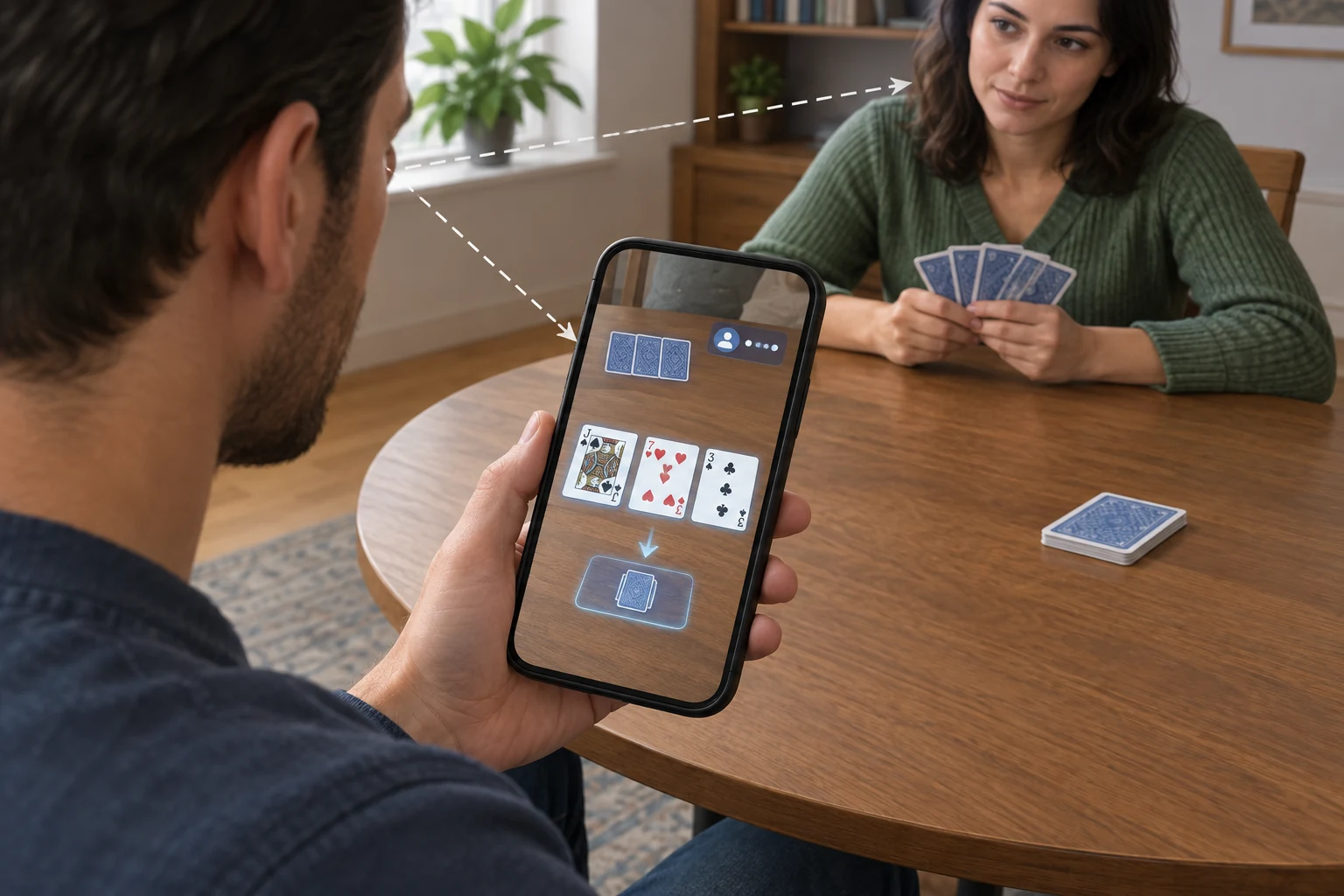
AR is more appropriate when digital content should supplement an existing activity rather than replace the player’s surroundings.
Possible applications include:
- Live event overlays: Statistics, markets, or game status displayed alongside a broadcast or venue view.
- Tabletop visualization: A phone camera displays digital cards, chips, or a game board on a detected surface.
- Rule guidance: Contextual instructions appear while the user learns a game.
- Venue navigation: An application identifies areas, services, or non-game information within a physical property.
- Promotional experiences: Digital objects or animations are triggered by approved markers or locations.
- Second-screen interfaces: A mobile device presents supplementary controls while the primary game remains elsewhere.
AR’s advantage is accessibility through familiar mobile hardware. Its weakness is divided attention. If a player must alternate between a live event, a physical venue, and a small display, information can become harder—not easier—to process.
AR should not be used in ways that encourage a person to walk through public or gaming spaces while focusing on a screen. Interfaces should minimize unnecessary movement and make it clear when the user must stop to interact.
MR: spatial tables and room-based play
MR can place gambling interfaces into the user’s actual surroundings while preserving a stronger sense of depth and position than basic AR.
Relevant scenarios include:
- A virtual table anchored to a physical surface
- Game controls arranged around the player’s room
- Remote participants represented around a shared spatial object
- Multiple game displays placed on separate walls or surfaces
- Instructional content attached to specific areas of a virtual table
- Spectator views that appear as spatial windows within the room
MR can combine qualities of physical and digital play. The player sees the real room and may use natural hand movements, yet the table, chips, cards, or event displays are software-defined.
The environment cannot be assumed to be uniform, however. A layout that works in a large, uncluttered room may fail in a smaller space. Dark surfaces, reflective materials, moving people, and changing light can affect environmental sensing. MR gambling interfaces therefore need alternatives to precise spatial gestures, including conventional menus and accessible input methods.
How the User Experience Changes
Presence and attention
VR directs most visual attention into a controlled digital world. AR distributes attention between the real environment and a screen or overlay. MR asks users to treat digital and physical objects as parts of the same space.
These differences affect interface design:
- VR interfaces should provide strong orientation, readable account status, and clear ways to leave or pause the experience.
- AR interfaces should avoid covering important real-world details and should limit visual clutter.
- MR interfaces should communicate which objects are interactive, where they are anchored, and what happens if tracking is lost.
Interaction and feedback
A flat gambling interface can confirm an action with a button state or dialog. Spatial interfaces may also use object movement, sound, controller vibration, or hand animation.
Regardless of technology, consequential actions should not rely on immersive cues alone. A wager needs explicit values, selections, and confirmation states. Decorative gestures should not make it easy to confuse browsing, preparing a bet, and placing one.
Social experience
VR can create a strong sense of co-location even when users are geographically separate. MR may combine remote participants with awareness of people physically present. AR generally leaves real-world social interaction intact while adding a digital layer.
Social presence also introduces moderation and privacy considerations. Voice, avatar movement, usernames, and spatial behavior may expose more personal information than a conventional text-based interface. Players need understandable controls for muting, blocking, reporting, and managing visibility.
Session boundaries
Immersive environments can make conventional signals—such as browser tabs, clocks, and nearby activity—less noticeable. Effective experiences should keep session information available rather than hiding it for the sake of realism.
Useful controls include:
- A clearly visible clock or elapsed-time indicator
- Accessible account and balance information
- Unambiguous stake and transaction displays
- Easy pause and exit functions
- User-controlled notifications and session reminders
- Responsible-gambling tools that remain reachable from the main experience
Devices, Interaction, and Environment
VR hardware relationship
VR normally requires a headset capable of head tracking. Some systems also use handheld controllers, hand tracking, external tracking components, or a physical play boundary.
The important application-level questions are not which headset is “best,” but whether the experience supports:
- Seated and standing modes
- Different input methods
- Readable text at comfortable viewing distances
- Re-centering and boundary controls
- Reduced-motion options
- Simple exit and recovery paths
For device categories and compatibility considerations, see the separate guide to VR headsets.
AR hardware relationship
Phone- and tablet-based AR uses a camera, display, and motion sensors. This reduces the need for specialized hardware, but holding a device for long periods can create fatigue. A handheld screen also limits the field in which digital content appears.
Wearable AR can provide a hands-free view, but interface design must account for display area, brightness, input methods, and the fact that users continue to see the physical environment.
MR hardware relationship
MR depends more heavily on environmental sensing. The system may use outward-facing cameras and other sensors to estimate room geometry, identify surfaces, track hands, and maintain the position of digital objects.
Before interaction begins, an application may need to:
- Confirm that the play area is suitable.
- Detect or let the user select a surface.
- Place the virtual table or interface.
- Verify that controls are within comfortable reach.
- Provide a fallback if spatial tracking becomes unreliable.
This setup creates friction, but it also allows a more stable relationship between digital content and the room.
Limitations and Risks
Physical comfort and accessibility
Immersive displays can cause discomfort for some users, particularly when visual movement does not match physical movement. Weight, fit, text size, contrast, audio design, reach requirements, and the need to stand can also affect accessibility.
Applications should offer alternatives where practical, such as:
- Seated play
- Snap turning or reduced camera motion
- Adjustable text and interface scale
- Controller, hand, and conventional input options
- Captions and independent audio controls
- High-contrast visual states
- Interfaces that do not depend solely on color or gesture
Spatial safety
VR reduces awareness of the room. AR can divert attention while the user remains mobile. MR preserves a view of the environment but may still obscure objects or represent boundaries imperfectly.
Players should use these experiences in an appropriate space, follow platform safety guidance, and avoid moving through public areas while concentrating on digital content.
Privacy and environmental data
Spatial systems may process information about the user’s movement, voice, hands, gaze, or surroundings. The exact data depends on the device and application.
Operators and developers should clearly explain:
- What sensor data is collected
- Whether environmental data leaves the device
- How voice and social interactions are handled
- Which permissions are required
- How users can delete or manage stored data
Seeing the real room through passthrough does not necessarily mean that room imagery is being recorded or transmitted, but users should not be expected to infer the difference. Permissions and data practices need explicit explanations.
Gambling-related risks
Immersion can make a gambling experience feel more immediate, but it does not improve the player’s odds. Real-money applications remain subject to applicable age, identity, location, licensing, and responsible-gambling requirements.
Design should avoid allowing spectacle to obscure essential facts. Players must be able to identify the operator, game rules, stake, potential outcome, account balance, and transaction status without interpreting animations or spatial effects.
Technical reliability
Tracking loss, network interruption, low battery, sensor obstruction, and software errors can disrupt spatial experiences. Gambling interfaces require predictable recovery behavior, especially when an interruption occurs around a transaction.
The application should make clear whether an action was:
- Not started
- Pending
- Accepted
- Rejected
- Settled
- Interrupted and awaiting confirmation
A dramatic virtual environment cannot substitute for a reliable, auditable transaction state.
Which Technology Fits Which Gambling Scenario?
Use this decision framework:
- Choose VR when the venue itself is the experience. It fits simulated casino floors, immersive social rooms, and games built around a fully digital setting.
- Choose AR when information should accompany the real world. It fits mobile overlays, contextual guidance, and lightweight companion features.
- Choose MR when digital gameplay must occupy physical space. It fits room-based tables, spatial controls, and persistent virtual objects anchored to real surfaces.
- Prefer a conventional interface when speed and clarity matter more than immersion. Not every casino or betting task benefits from a spatial design.
VR, AR, and MR are therefore not competing versions of the same interface. They represent different relationships between digital content and the player’s environment. The right choice depends on whether the intended experience requires replacement, augmentation, or integration.
For broader context on immersive systems, visit the VR technology section.