Free VR poker games let you sit at a virtual table, handle cards and chips with motion controllers, and play against other people without wagering real money. The strongest options are Vegas Infinite for its broad device support and polished social casino environment, and POKER VR for players who want a more poker-focused multiplayer app. Casino VR Poker is a legacy PC VR alternative, although prospective players should check recent server activity before installing it.
These games are generally free to download and use virtual chips. However, “free” does not always mean that every chip pack, cosmetic item, prop, or convenience feature is included. Store availability, age ratings, in-app purchases, and supported devices can also change, so check the current product page before downloading.
Free VR Poker Games at a Glance
| VR poker application | Main poker offering | Devices and storefronts | Multiplayer focus | Best suited to |
|---|---|---|---|---|
| Vegas Infinite | Play-money poker within a wider virtual casino | Meta Quest, PlayStation VR2, and Steam-based PC VR; availability varies by device and region | Public tables, private or social play, avatars, voice interaction | Players seeking polished tables, an active social setting, and broad platform availability |
| POKER VR | Poker-centered play-money tables | Meta Quest and PC VR storefront availability should be checked for the specific headset | Social multiplayer, table interaction, private play, virtual props | Players who prefer a dedicated poker application rather than a larger casino |
| Casino VR Poker | Multiplayer virtual poker | Steam-based PC VR | Traditional table-based multiplayer | PC VR users willing to check current community and server activity |
The best choice depends on more than graphics. Before installing, compare the poker format, controller support, player population, comfort settings, moderation tools, and whether the application allows private tables.
For other no-cost casino-style experiences, see the broader guide to free VR casino games.
How VR Poker Games Work
A VR poker app places each player around a three-dimensional table. Instead of clicking buttons on a flat screen, you normally use tracked controllers—or hand tracking where supported—to look at cards, move chips, select betting actions, and interact with other players.
Most free titles use play-money chips. These chips represent betting value inside the game but are not the same as cash. They generally cannot be withdrawn as money. Some apps sell optional chip packages or virtual items, so players should still review the purchase controls and account settings.
The basic flow of a Texas Hold’em hand
Texas Hold’em is the format most commonly associated with social VR poker. A standard hand follows this sequence:
- Blinds are posted. The two designated players place the small blind and big blind to create an initial pot.
- Each player receives two private cards. These are commonly called hole cards.
- The pre-flop betting round begins. Players may fold, call the current bet, or raise when the table rules permit.
- The flop is dealt. Three shared community cards appear in the center of the table.
- A second betting round takes place.
- The turn is dealt. A fourth community card is added, followed by another betting round.
- The river is dealt. The fifth and final community card appears, followed by the last betting round.
- Remaining hands go to showdown. Each player makes the strongest five-card hand possible from the available private and community cards.
A hand can also end before the showdown if every player except one folds.
Poker hand rankings
From strongest to weakest, the usual hand ranking is:
- Royal flush
- Straight flush
- Four of a kind
- Full house
- Flush
- Straight
- Three of a kind
- Two pair
- One pair
- High card
VR does not change these core rules. What it changes is how players view their cards, place bets, read the table, and communicate.
Why VR poker feels different from screen-based poker
The defining feature is spatial presence. Players occupy seats around a table and can turn toward one another, speak through voice chat, and use visible avatar movements. This makes a table feel closer to a social card room than a conventional poker interface.
However, avatar behavior is not a reliable substitute for real-world physical tells. Tracking quality, animation systems, deliberate gestures, latency, and idle movements can all affect what an avatar appears to do. Sound decision-making should still rely on betting patterns, stack sizes, position, and table rules.
Confirmed Free and Free-to-Play VR Poker Options
Vegas Infinite
Vegas Infinite is the most broadly accessible choice for players who want poker inside a polished social casino environment. It is free to download on supported platforms and uses virtual currency rather than direct real-money poker wagering.
Its principal advantages include:
- Support across major standalone, console, and PC VR ecosystems
- Multiplayer poker tables with avatar-based interaction
- A developed virtual venue rather than a minimal card-table interface
- Social features for playing and communicating with other users
- Additional casino-style activities outside poker
The wider casino setting can be either a benefit or a distraction. Players who want variety and an elaborate social space may prefer it. Those looking only for streamlined poker may find a dedicated app more direct.
Optional purchases and virtual-currency systems should be reviewed carefully, particularly when an account is used by more than one person. Platform age restrictions and regional availability may apply.
For a closer look at this specific application, read the separate Vegas Infinite review.
POKER VR
POKER VR is the more focused option in this selection. Its main appeal is the combination of multiplayer poker and the physical interaction expected from a purpose-built VR card room.
Depending on the currently available version and platform, the experience may include public tables, private play, voice communication, avatar customization, and interactive table objects. The exact modes and device support should be confirmed on the relevant headset or PC storefront before installation.
Choose POKER VR if you value:
- A poker-first interface
- Social tables without a large surrounding casino
- Controller-based card and chip interaction
- Private games or friend-based sessions, where available
- A casual atmosphere built around multiplayer poker
The practical quality of any multiplayer title depends partly on who is online. Check recent user feedback for your region and usual playing time, especially if quick matchmaking is important.
A dedicated POKER VR review covers that application in more depth.
Casino VR Poker
Casino VR Poker is a PC VR option associated with Steam-based headsets and controllers. It offers a traditional virtual-table concept and can still be relevant to players with older or established PC VR setups.
Treat it as a legacy option rather than the default recommendation. Before downloading, verify:
- Whether the application still supports your headset and controllers
- Whether multiplayer servers are operating normally
- Whether players are active during your preferred hours
- Whether recent users report technical or compatibility problems
- Whether the available table format matches what you want to play
A free download has limited value if the tables are empty, so current community activity matters as much as the original feature list.
Tables, Gestures, and Multiplayer Features
The best VR poker application is not necessarily the one with the most decorative features. Good table interaction should make every important action clear while preventing accidental bets.
Card handling
A typical VR interface lets you peek at private cards by lifting or tilting their edge. This can feel natural, but it also introduces practical questions:
- Are the cards easy to read at the headset’s resolution?
- Can the viewing angle be adjusted?
- Does the game prevent other players from seeing private cards?
- Is there an alternative input method if physical card handling is uncomfortable?
- Can left-handed players interact naturally?
The app should protect hidden information regardless of how an avatar moves. A card-peeking animation may be visible to others, but the actual card faces should remain private.
Betting and chip controls
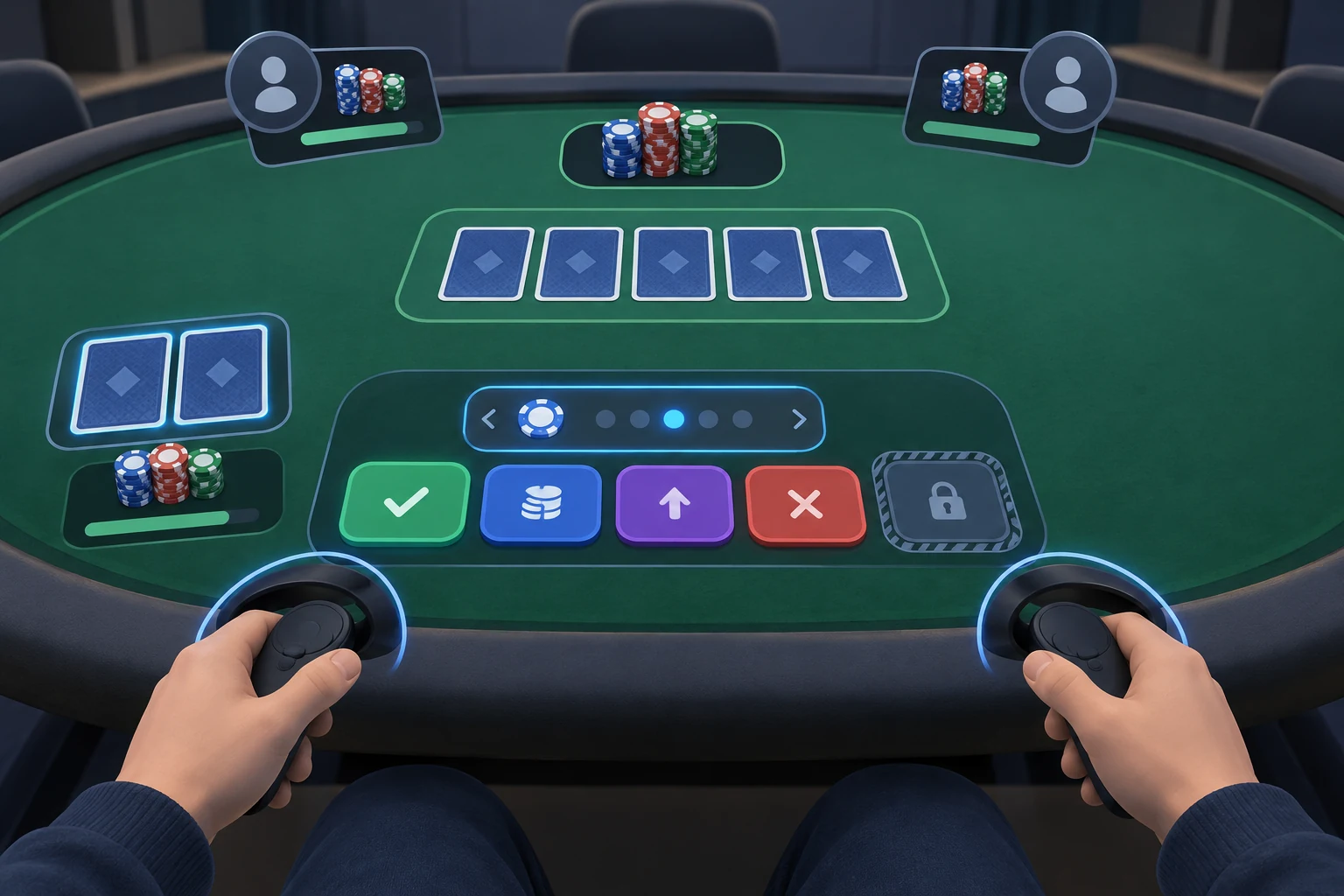
VR poker games may represent betting through chip movement, controller gestures, or interface buttons. A strong system should display the proposed bet before it is committed.
Look for:
- Clear call, check, raise, and fold controls
- A readable bet amount
- Confirmation for unusually large bets
- An accessible way to select precise chip values
- Protection against unintended controller movement
- An all-in action that is difficult to trigger accidentally
- Visible pot and stack totals
Physically tossing chips can be entertaining, but accuracy is more important than theatrical interaction. Menu-based bet sizing may be preferable when playing seriously.
Avatars, voice chat, and table presence
Multiplayer VR poker is inherently social. Voice chat can recreate table conversation, while head and hand tracking give each avatar a visible presence.
Useful social controls include:
- Individual mute options
- Block and report functions
- Personal-space or boundary settings
- Private rooms
- Friend invitations
- Host controls
- Language or region filters, where available
These tools are especially important at public tables. Poker involves waiting between turns, so disruptive audio or intrusive avatar behavior can quickly become more noticeable than in a fast-paced game.
Public tables versus private rooms
Public tables are better for immediate matchmaking and meeting new players. Their drawbacks include unpredictable table etiquette, varying skill levels, and possible voice-chat disruption.
Private rooms are better for scheduled games with friends. Before choosing an app for a group, confirm:
- The maximum supported table size
- Whether every participant needs the same headset ecosystem
- Whether cross-platform play is supported
- How invitations work
- Whether a host can remove or mute participants
- Whether the table can set blinds, limits, or starting stacks
Do not assume that two versions of the same app can play together simply because both are free. Cross-platform multiplayer must be supported by the application itself.
Poker Variants and Virtual Chips
Not every VR poker table follows identical rules. Even when two apps both offer Texas Hold’em, the betting structure and session format may differ.
Common table formats
| Format | How it works | Suitable for |
|---|---|---|
| Cash-style play-money table | Chips move between pots while blinds usually remain stable for the session | Casual drop-in play and learning table flow |
| Tournament | Blinds generally rise over time and players are eliminated after losing their stack | Structured, competitive sessions |
| Sit-and-go | A smaller scheduled or automatically starting tournament | Players wanting a defined session without a large event |
| Private table | Access is limited to invited players or a room code | Friends, clubs, and beginner practice |
| Heads-up | Two players compete directly | Fast decision-making and one-on-one practice |
Availability differs by app and can change with updates. Check the live mode list rather than choosing based on an old screenshot or review.
No-limit, pot-limit, and fixed-limit betting
The betting structure affects how much a player can raise:
- No-limit: A player may usually bet any amount up to the full stack when it is legal to act.
- Pot-limit: The maximum raise is tied to the current size of the pot.
- Fixed-limit: Bets and raises use predetermined increments.
Texas Hold’em is often played as no-limit, but players should always read the table label before sitting down.
What “play money” means
Play-money poker uses in-game credits with no direct cash redemption. It is useful for learning turn order, hand rankings, bet sizing, and VR controls without entering a real-money poker game.
It does not make the experience consequence-free. An application may offer:
- Optional virtual-chip purchases
- Cosmetic items
- Subscription-style benefits
- Daily chip grants or timed rewards
- Restrictions tied to account age or platform policy
Never assume virtual chips can be sold, transferred, or withdrawn. Review the application’s current terms and purchase information instead.
Headset Compatibility and Setup
VR poker does not require a large room, but it does require a comfortable seated position and reliable controls. A headset may be technically supported while still offering a poor experience if text is difficult to read or controller tracking is obstructed.
Choosing by VR platform
Meta Quest users: Vegas Infinite and POKER VR are the main options to investigate. Confirm support for the exact Quest model because older headsets can lose access to newer app versions.
PlayStation VR2 users: Vegas Infinite is the principal option in this comparison. A PlayStation account and current store availability are required.
PC VR users: Check Steam listings for Vegas Infinite, POKER VR, and Casino VR Poker. Compare the listed headset, controller, operating-system, and performance requirements with the actual PC setup.
A Steam listing does not guarantee identical support for every headset that can access SteamVR. Controller mappings and performance can vary.
How to start playing
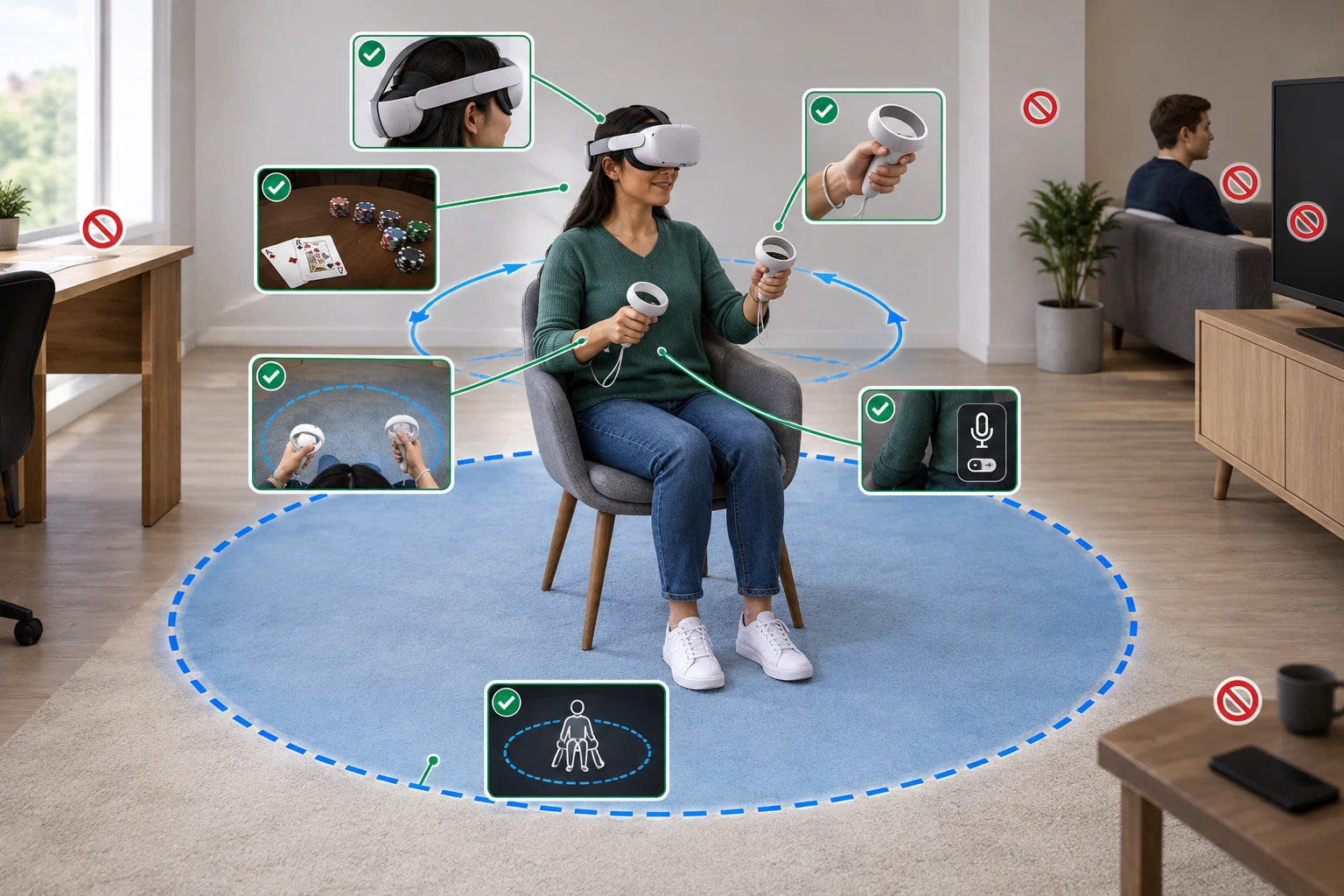
- Confirm the exact headset model. Do not rely on a general platform name such as “Quest” or “PC VR.”
- Open the official device storefront. Check that the app is available in your region and supports your hardware.
- Review age and purchase information. Note any in-app purchases, virtual-currency features, or account restrictions.
- Check the required input method. Determine whether the app uses tracked controllers, hand tracking, or both.
- Create enough seated space. Keep the table area clear so controllers cannot strike a desk, wall, monitor, or another person.
- Adjust headset fit and clarity. Poker cards, chip values, and action prompts must be readable without strain.
- Complete the tutorial. Learn how to check cards, fold, call, raise, mute users, and leave a table.
- Join a low-pressure table first. Use the first session to test tracking and controls rather than concentrating on results.
- Configure social settings. Set voice volume, personal boundaries, and notification preferences before extended play.
Pre-installation checklist
Choose an app only after confirming:
- [ ] It supports your exact headset and controllers.
- [ ] Its principal poker mode is available without payment.
- [ ] The table rules and betting format are clearly identified.
- [ ] Public matchmaking is active when you normally play.
- [ ] Private rooms are available if you want to play with friends.
- [ ] Cross-platform support meets your group’s needs.
- [ ] Mute, block, and report tools are easy to access.
- [ ] Bet amounts are visible before confirmation.
- [ ] Seated play and comfort settings suit your space.
- [ ] Optional purchases can be restricted where necessary.
Which Free VR Poker Game Should You Choose?
Choose Vegas Infinite if device compatibility, presentation, and a larger social casino environment are the priorities. Choose POKER VR if you prefer a dedicated multiplayer poker room with fewer non-poker distractions. Consider Casino VR Poker only after confirming that its PC VR support and current player activity meet your needs.
For beginners, the most important features are readable cards, clear betting controls, a tutorial, and accessible moderation tools. For groups, private-room access and cross-platform compatibility matter more. Experienced players should focus on table formats, bet sizing, population at their preferred stakes, and the reliability of controller input.
Whichever app you select, verify its current storefront listing before installation. VR platforms, supported headsets, multiplayer populations, and virtual-currency systems can change, while the essential goal remains the same: a clear, comfortable play-money poker table where the technology supports the game rather than getting in its way.